

“Scopus search” is among the most frequent phrases researchers type into Google, and understandably so. Promotions, PhD submissions, grant applications, NAAC and NIRF reports and university rankings all pose the same question: is this paper or journal in Scopus? Even so, most researchers lack institutional Scopus access, and the official interface can be confusing even for those who have it.
Here you will find each method of searching Scopus in 2026, whether by title, DOI, author or journal, along with ready advanced queries to copy. The guide also shows how to test whether your paper is indexed, explains why a paper may not show up, describes how to document Scopus evidence for official files, and outlines the steps editors and publishers can take so their journals stay discoverable.
Scopus Explained (2026 Numbers)
Scopus is the abstract and citation database run by Elsevier. Its coverage spans peer-reviewed journals, book series, conference proceedings and trade journals in science, technology, medicine, the social sciences and the arts and humanities. The data behind SJR (SCImago Journal Rank), journal quartiles (Q1 to Q4), CiteScore and the Scopus h-index all comes from Scopus. The THE and QS university rankings also draw on it, as do many Indian institutions for NIRF and NAAC reporting. Knowing the scope of the database helps you judge what an indexing claim does and does not tell you.
The Scopus database is curated. Merely asking does not get a journal listed: it must apply and be assessed by an independent content selection board. Once accepted, its content is covered starting from an agreed point, and a later re-evaluation may end that coverage. For this reason, any answer to “is it in Scopus?” needs a date attached.
| Scopus Source List, August 2026 | Count |
|---|---|
| Total sources listed (all types, active and inactive) | 49,009 |
| Active journals | 30,200 |
| Active book series | 1,819 |
| Titles on the discontinued list | 1,160 |
| Newly accepted titles being added | 905 |
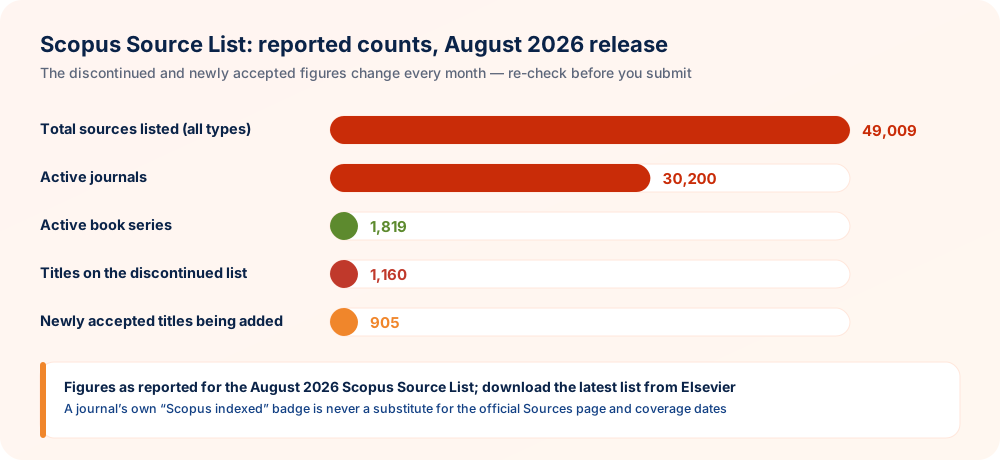
Counts of discontinued and newly accepted titles shift monthly, so “is this journal still in Scopus?” deserves a fresh check before each submission. The figures above reflect the August 2026 release as reported, and the current list is available for download from Elsevier’s Scopus content page.
Scopus Search Types and Which Ones Are Free
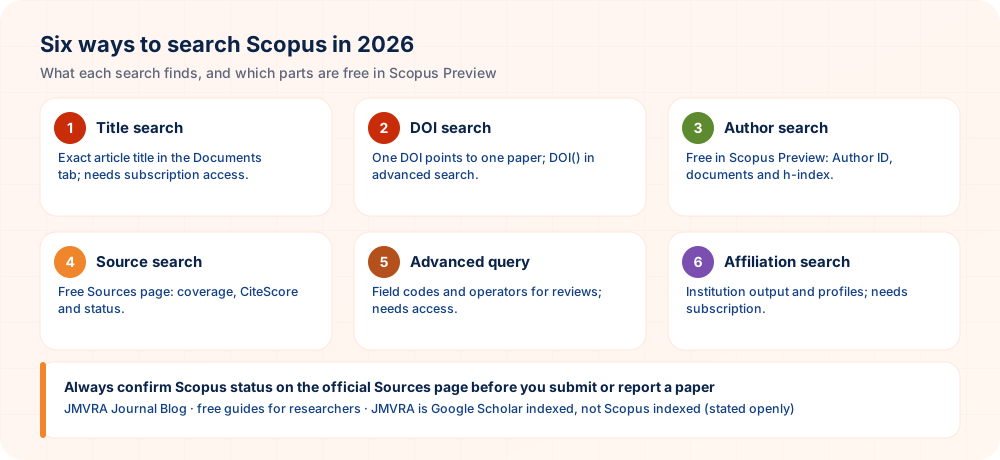
Scopus offers four main kinds of search. Below you can see what each does, whether it needs a subscription, and the free alternative available.
| Search type | What you find | On scopus.com | Free option |
|---|---|---|---|
| Document search (article / paper search) | Articles, reviews, conference papers, chapters | Subscription required | Find the paper in its author’s free Scopus Preview profile |
| Author search | Author profile, Scopus Author ID, h-index, documents | Basic lookup free via Scopus Preview | Scopus Preview author lookup |
| Source search (journal search) | Journal coverage, CiteScore, status | Sources page free | Official Sources page; JMVRA’s list of Scopus indexed journals as a starting point |
| Affiliation search | Institution profile and output | Subscription required | Ask your library or research office |
Free Ways to Reach a Scopus Record
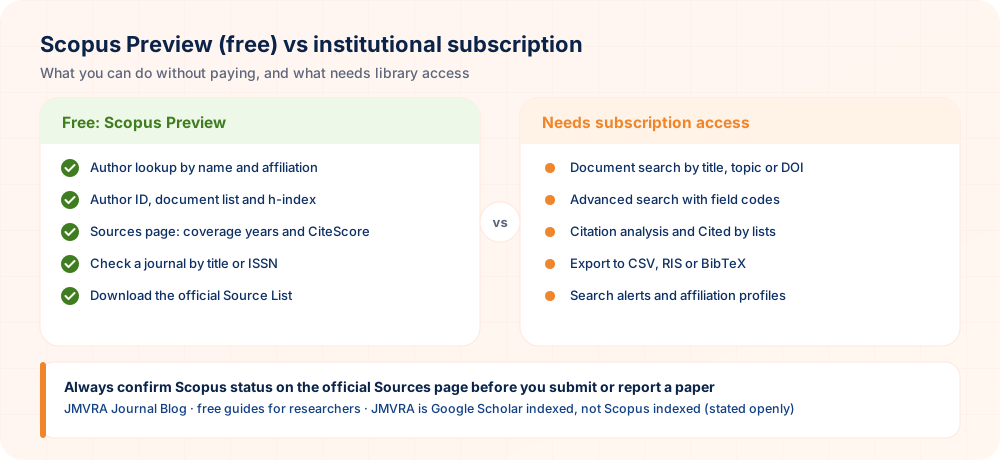
Even lacking institutional access, you can settle most routine Scopus questions truthfully and at no cost. Four routes handle almost every case:
Author profile route
Look up any one of the paper’s authors in Scopus Preview, open the profile and locate the paper in the document list, where its source and citation count appear.
Sources page route
Search the journal title or ISSN at scopus.com/sources. The source page displays coverage years, CiteScore and whether Scopus still covers the title.
Start by resolving the DOI
Add the DOI after https://doi.org/ to reach the actual publisher page, write down the journal and ISSN, and look that ISSN up on the Sources page.
Ask your library
A good number of Indian universities hold subscriptions through the library or a consortium, and the librarian can search documents and export records for you.
Get the Source List file
The official Source List spreadsheet contains every title, ISSN and coverage period, so you can filter it by ISSN within seconds.
Begin with a curated list
Go through JMVRA’s searchable list first, and then verify each title on the official Sources page.
Method 1: Searching Scopus for an Article by Title
Title search is the most common way to look for a paper in Scopus, and most people use it to find their own work. With subscription access it takes only a few seconds:
- Open scopus.com through your campus network, VPN or institutional login.
- On the Documents tab, select Article title as the search field.
- Enter the title exactly as published, taking it from the journal site or your PDF to keep spelling, hyphens and special characters identical.
- Click Search.
- Each hit lists its title, authors, journal (source) name, year, document type, citation count and DOI, plus a link into the Scopus record, so scan those details.
Without access, take the author profile route: find the first or corresponding author in Scopus Preview, open the profile, and look for the paper in the document list. If it appears under none of its authors, it is very unlikely to be in Scopus.
Searching by title suits tasks such as:
- Confirming that your own published paper is in Scopus
- Obtaining a paper’s Scopus citation count for a CV, appraisal or grant form
- Testing the claim of a co-author, student or candidate that a paper is “Scopus indexed”
- Getting a Scopus link to include in API / CAS promotion files, PhD documents or NAAC records
Method 2: Searching Scopus by DOI
Because a DOI (Digital Object Identifier) points to exactly one paper, it is the most precise key for a Scopus search. A DOI looks like 10.xxxx/xxxxx: a prefix naming the registrant followed by a suffix naming the item. If identifiers are new to you, read our DOI explainer.
- Take the DOI from the article page or the PDF; either the bare DOI or one with https://doi.org/ in front will work.
- Once on scopus.com, set the search field to DOI under the Documents tab; in advanced search,
DOI()does the same job. - Paste the DOI and run the search. If Scopus has indexed the paper, its record appears straight away.
If you lack access, begin by resolving the DOI at doi.org. This takes you to the true article page at the publisher, revealing the journal and ISSN, which is useful protection against cloned websites. Next, look that ISSN up on the Sources page and locate the paper via its author’s profile.
Method 3: Using Document Search on scopus.com
If your university or institute subscribes to Scopus, the full Scopus document search is available to you:
- Go to scopus.com through your campus network, VPN or institutional login. Many Indian institutions provide access via their library or a consortium.
- Under the Documents tab, select what to search in: Article title, Abstract, Keywords; Authors; Source title; DOI; Affiliation, among other options.
- Enter your terms and add further fields with + Add search field, for instance to limit by year or document type.
- Use the left-hand filters to cut down the list by year, subject area, document type, source title, open access status and language.
- You can export results (CSV, RIS, BibTeX), create alerts, or follow citations by clicking Cited by.
The free routes cover only author and source lookups. A subscription adds topic searches, citation analysis and the advanced query language described next.
Field Codes in Scopus Advanced Search
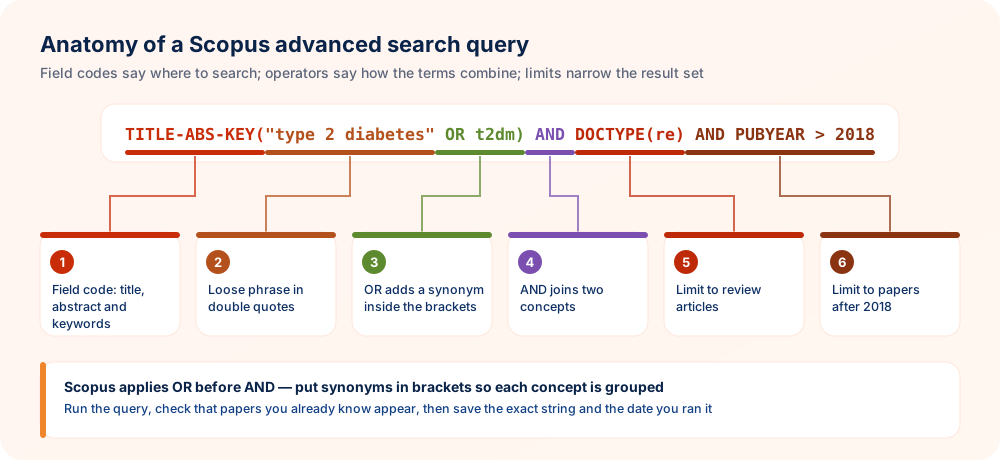
With Scopus advanced search you can build exact queries from field codes, Boolean operators and proximity operators, which suits systematic reviews, bibliometric studies and literature searches. The field code tells Scopus where to look, and the brackets that follow contain what to look for.
| Field code | Searches in | Example |
|---|---|---|
TITLE-ABS-KEY() | Title, abstract and keywords (the most used field) | TITLE-ABS-KEY("machine learning") |
TITLE() | Article title only | TITLE(biochar) |
DOI() | Exact DOI | DOI(10.xxxx/xxxxx) |
AUTH() | Author name | AUTH(sharma a) |
AU-ID() | Scopus Author ID (most reliable for one author) | AU-ID(your-author-id) |
AFFIL() | Affiliation / institution | AFFIL("your institute name") |
SRCTITLE() | Journal / source title | SRCTITLE("journal title") |
ISSN() | Journal ISSN | ISSN(xxxx-xxxx) |
PUBYEAR | Publication year (greater than, less than or equal to a year) | PUBYEAR > 2021 |
DOCTYPE() | Document type: ar article, re review, cp conference paper, ch book chapter | DOCTYPE(re) |
SUBJAREA() | Subject area code, e.g. MEDI, ENGI, COMP | SUBJAREA(COMP) |
LANGUAGE() | Language of the document | LANGUAGE(english) |
AUTHKEY() | Author keywords only | AUTHKEY(biochar) |
FUND-SPONSOR() | Funding body named in the paper | FUND-SPONSOR("funding agency") |
OPENACCESS() | Open access documents (1) or not (0) | OPENACCESS(1) |
Operators Worth Knowing
- AND, OR, AND NOT: join terms together, with AND NOT placed at the end of a query.
- “double quotes”: a loose phrase match, for example
"heart attack", which also picks up plurals and punctuation variants. - {curly braces}: an exact phrase matched character for character, for example
{heart-attack}. - W/n: terms lying within n words of one another, in either order, for example
solar W/3 cell. - PRE/n: the first term comes before the second, separated by at most n words.
- Use the * wildcard for word endings (
nanoparticle*) and ? for one single character (wom?n).
Scopus evaluates operators in a set sequence: OR first, then proximity operators, then AND, and AND NOT last. A query like diabetes AND telemedicine OR mhealth is therefore interpreted as diabetes AND (telemedicine OR mhealth). Brackets state your intention explicitly, so add them whenever you combine operators.
| You type | Scopus matches | Use it when |
|---|---|---|
"heart attack" | heart attack, heart attacks, heart-attack | Normal phrase searching |
{{heart attack}} | Exactly “heart attack”, nothing else | Codes, formulas or fixed terms |
nanoparticle* | nanoparticle, nanoparticles, nanoparticulate | Word endings vary |
wom?n | woman, women | One letter varies |
solar W/3 cell | solar cell, cell for solar, solar thin-film cell | Words can be separated |
Scopus Search Queries Ready to Use
Paste any of these into the advanced search box and swap the sample terms for your own.
1List every paper by one author, newest first
AU-ID(your-scopus-author-id) AND PUBYEAR > 2019Order the results by date. Searching by Author ID is far more reliable than using a name.
2Systematic review search on a topic, limited to articles and reviews
TITLE-ABS-KEY(("type 2 diabetes" OR T2DM) AND (telemedicine OR "mobile health" OR mhealth)) AND DOCTYPE(ar OR re) AND PUBYEAR > 2018Every concept forms a bracketed group of synonyms, and AND links the concepts.
3What your institution has published in one subject
AFFIL("your university name") AND SUBJAREA(ENGI) AND PUBYEAR > 2022Test different ways of spelling the name of your institution, or open its affiliation profile when you have access.
4All the articles a journal has published on a topic
ISSN(xxxx-xxxx) AND TITLE-ABS-KEY("life cycle assessment")Prefer the ISSN to the title, since it prevents mix-ups with look-alike journal names.
5Only the latest review articles
TITLE-ABS-KEY("large language model*") AND DOCTYPE(re) AND PUBYEAR > 2023A sound place to begin when drafting a paper’s background section.
6Two concepts placed near each other
TITLE-ABS-KEY(microplastic* W/5 (soil OR sediment))Proximity searching surfaces papers in which the ideas are connected, not merely both mentioned.
7Filter out a noisy topic
TITLE-ABS-KEY(graphene AND supercapacitor) AND NOT TITLE-ABS-KEY(battery)Put AND NOT last, and make sure relevant papers have not been excluded.
8Computer science conference papers
TITLE-ABS-KEY("federated learning") AND DOCTYPE(cp) AND SUBJAREA(COMP)Handy in fast-moving fields where conferences come ahead of journals.
Before beginning a systematic search, find out which journals publish the most in your area; the JMVRA Journal Finder and our guide to selecting a journal let you map the field quickly.
Constructing a Systematic Search Step by Step
An effective search string is constructed rather than simply typed. Systematic reviewers repeat the same pattern each time, and it suits an ordinary literature review equally well:
- Break the question into concepts — normally two or three, for example population, intervention and outcome.
- Note synonyms for every concept — spelling variants, abbreviations, and older as well as newer terms.
- Connect synonyms with OR within brackets, using one bracket for each concept.
- Link the concepts with AND and enclose them in
TITLE-ABS-KEY(). - Apply limits at the end — years, document type, language — and only where your protocol permits.
- Validate with papers you know — should three important papers that you are aware of fail to appear, revise the string.
- Write down the final string and the date — a review must report precisely what was searched.
| Concept | Synonyms | Query part |
|---|---|---|
| Population | type 2 diabetes, T2DM, diabetes mellitus type 2 | ("type 2 diabetes" OR T2DM OR "diabetes mellitus type 2") |
| Intervention | telemedicine, mobile health, mHealth, telehealth | (telemedicine OR "mobile health" OR mhealth OR telehealth) |
| Outcome | glycaemic control, HbA1c | ("glycemic control" OR "glycaemic control" OR HbA1c) |
Put together, the three parts form a single TITLE-ABS-KEY() query linked with AND. For the writing stage that comes next, our Literature Reviews That Synthesise, Not List shows how to shape search results into a structured review.
Exporting Results, Setting Alerts and Using Reference Managers
Users with a subscription can export selected Scopus records in CSV, RIS or BibTeX format. Reference managers such as Zotero, Mendeley and EndNote read RIS and BibTeX files straight away, while a CSV file can be opened in a spreadsheet to screen the results. Naming the exported file after the search keeps your folders easy to sort later.
- Export in small batches — Scopus caps how many records can be downloaded in a single export.
- Pick your fields — when screening, keep the title, abstract, keywords, DOI and document type.
- Save a search alert — Scopus can send you an email whenever new papers fit a stored query.
- Turn on “Cited by” alerts — track who cites an important paper, your own work included.
- Strip out duplicates — when other databases are searched too, remove repeats by DOI before you start screening.
Searching for Authors in Scopus and Your Author ID
Once you publish in a source that Scopus indexes, it builds an Author Profile for you on its own and gives it a unique Scopus Author ID. The profile lists your documents, your citations and your Scopus h-index, the figure that most evaluation committees want to see.
Finding your Scopus Author ID for free
- Try the free author lookup in Scopus Preview; no subscription is needed.
- Enter your surname, first name and institution.
- Open your profile, then write down the Author ID (a long number) and the h-index shown there.
- Connect the profile with your ORCID iD so that your new papers are credited to you more reliably; our ORCID guide explains how.
How to repair a split or incorrect author profile
It is common for a researcher to end up with two or more Scopus profiles, caused by name variants such as “A. Kumar” and “Anil Kumar” or by a move to another institution. Scopus has an author feedback process for merging profiles or correcting the list of publications. Linking your ORCID to Scopus also keeps the profile tidy. Review your profile after each new publication so errors do not pile up.
| Problem | Likely cause | Fix |
|---|---|---|
| One person with two profiles | Name spelled differently in two journals | Ask for a merge through Scopus author feedback |
| A paper by someone else sits in your profile | Similar name and research area | Ask for the wrong document to be removed |
| Your paper is absent from your profile | Placed under a separate, split profile | Find it by title, then ask for it to be added |
| Old affiliation shown | Newest paper not processed yet | Normally refreshed once the next indexed paper arrives |
Looking to build a stronger citation record? See the h-index explained to learn how the figure is worked out and what it can and cannot tell you about your research.
Searching Scopus Journals and Journal Ranking
A journal search in Scopus helps you answer questions like “is this journal Scopus indexed?”, “is it still active?”, “which quartile does it sit in?” and “which are the best Scopus journals in my area?”. The routes below show where to look. Write down the date of each check so you can show it later.
| Your question | Where to check |
|---|---|
| Is this journal indexed in Scopus? Is it active, inactive or discontinued? | The official Scopus Sources page, searched with the ISSN |
| Which journals have been dropped from Scopus? | The discontinued titles list in the newest Source List download |
| Which journals have recently been added? | The newly accepted titles list on Elsevier’s content page |
| Ranking Scopus journals by SJR, quartile and h-index | SCImago Journal & Country Rank (scimagojr.com) |
| A first list of Scopus journals to browse | JMVRA’s list of Scopus indexed journals, followed by an official check |
| Which journal suits my abstract? | JMVRA Journal Finder |
How the ranking of Scopus journals works
CiteScore is published by Scopus itself, whereas SJR and the Q1 to Q4 quartiles are produced by SCImago from Scopus data. A quartile is always measured within a subject category: journals in the top 25% by SJR of a category fall in Q1, the following 25% in Q2, and so forth. That is why one journal may be Q1 in one category and Q2 in another. For a fuller account, see our guide to Scopus journals, the quartile guide and impact factor explained.
| Metric | Who publishes it | What it measures |
|---|---|---|
| CiteScore | Scopus (Elsevier) | Citations received by a journal’s recent documents, averaged across four years |
| SJR | Provided by SCImago using Scopus data | Citations weighted by how prestigious the citing journal is |
| Quartile (Q1–Q4) | SCImago, from SJR | Where a journal stands inside its subject category |
Checking Whether Your Paper Is Indexed
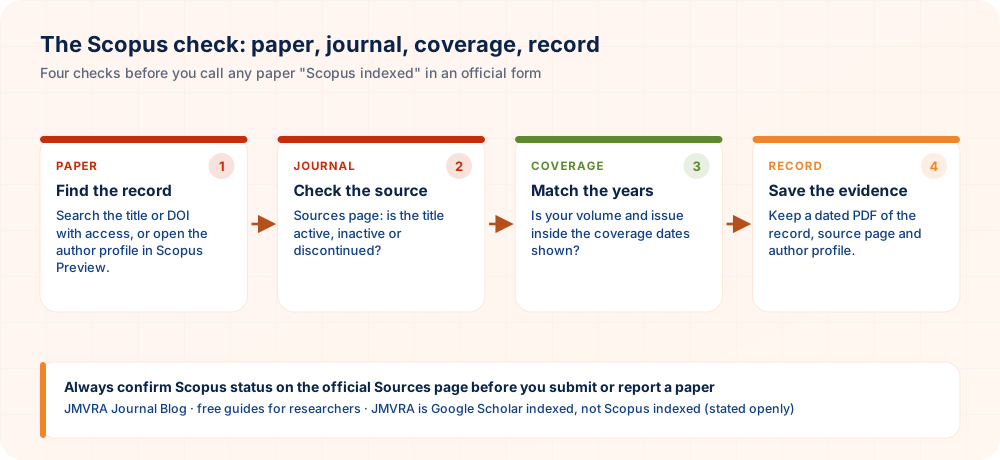
Carry out these three checks before you describe a paper as “Scopus indexed” on any official form:
- Start with the paper itself: enter its DOI or title at scopus.com, or find it via an author’s free Scopus Preview profile. Having a Scopus record is the strongest evidence you can get.
- Check the journal’s status: find the journal on the Sources page and note whether it is listed as active, inactive or discontinued.
- Check the coverage period: for a discontinued journal, Scopus covers content only up to the last covered volume and issue, so papers that appeared later are not indexed.
How long does Scopus indexing take? Papers in actively covered journals frequently show up a few weeks after publication, though the exact time depends on how fast the publisher sends content to Scopus. If your paper still cannot be found after two to three months, write to the journal or publisher and include the paper details. Keep a copy of that message with your records.
Our guide to verifying indexed journals uses the same approach for Web of Science, DOAJ and Google Scholar.
Reasons Your Paper Does Not Appear in Scopus
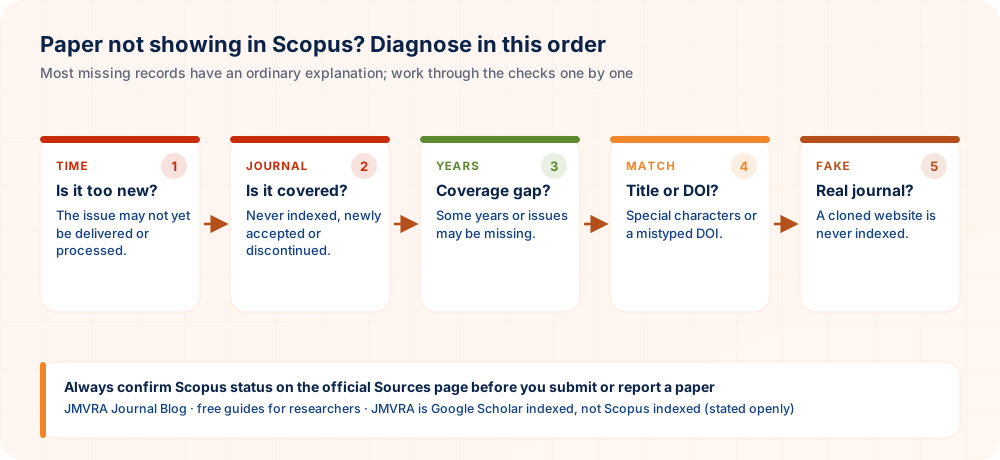
- The paper is too recent. Either the publisher has yet to send the issue to Scopus, or Scopus is still processing it.
- The journal is not covered, or no longer is. It might never have been indexed, might be a newly accepted title still being added, or might have been discontinued before your issue appeared.
- Only some of the journal is covered. Scopus coverage of certain years or issues may have gaps.
- The title or DOI is not matching. Possible causes are special characters, an incorrect DOI, or a title altered in the final version.
- The journal is hijacked or fake. The site copies a real Scopus journal, yet your paper was never published in the genuine one.
- The item is a document type Scopus does not index, such as certain editorials, meeting abstracts or supplements.
Go through the causes in the order given. The first three come down to timing or coverage; the fourth is a search issue you can correct; the fifth is a serious matter, and finding it early is much better.
Recognising Fake “Scopus Indexed” Claims
A Scopus listing carries so much weight in careers that it is also the claim that gets faked most often. Set what a journal states beside what you are able to check:
| What the journal states | How to test it |
|---|---|
| A “Scopus indexed” badge or logo on the home page | Look up the ISSN on the Sources page; a logo is no proof |
| “Indexed in Scopus, publication guaranteed” | No real journal can promise acceptance |
| “Scopus indexing in 15 days” for a fee | A journal cannot buy or sell indexing for single papers |
| A Scopus link leading to an imitation site | Enter scopus.com yourself and do not rely on links placed on the journal’s page |
| Shares a Scopus journal’s title but has another website | Match the publisher and URL against the official source record |
| “Scopus approved” or “Scopus standard” | Scopus does not use these terms; request the source record |
Our article on “Scopus standard” and “WoS standard” claims shows why these phrases carry no meaning by themselves.
Keeping Scopus Evidence for Official Files
Panels handling API / CAS promotion, PhD submission, NAAC and NIRF are asking more and more for evidence instead of a statement on a form. Keeping a brief, dated evidence file for each paper spares everybody time:
| Item | Why it matters |
|---|---|
| PDF of the Scopus document record | Displays the paper, its source and its document type |
| PDF of the source page showing coverage years | Proves the journal was covered when your paper came out |
| Author profile page showing the Author ID | Ties the paper to you, together with your h-index |
| DOI link that resolves to the publisher’s page | Confirms the paper sits in the genuine journal and not a clone |
| The date of your check | Scopus status can change; the date keeps the record truthful |
Store the evidence files in the same sequence as your publication list and refresh them whenever a status changes.
Advice for Journal Editors, Publishers and Societies
Editors, publishers and scholarly societies use Scopus for another reason: to see how visible, how well indexed and how reputable their journal is. These are the points that count in 2026.
1. Check your journal’s Scopus status on a regular basis
Scopus keeps re-evaluating the titles it indexes and lists discontinued ones in its periodic source list updates. Look up your title on the Sources page, and follow the discontinued and newly accepted lists for your subject area.
2. Know what can trigger a re-evaluation
Journals are often flagged because of publication concerns, outlier behaviour such as abrupt jumps in output or odd citation and self-citation patterns, and results below benchmarks. Rigorous peer review, a clear ethics policy, an international editorial board and a steady, consistent output do much more to protect a journal than rapid growth. Editors should review these signals at the end of each volume.
3. Getting a journal ready for Scopus evaluation
When Scopus evaluates a title it weighs policy, quality of content, citedness, regularity and availability online (details on Elsevier’s content policy and selection page). Before submitting an application, a journal ought normally to meet these conditions:
- A registered ISSN and a clear, regular publication schedule
- Documented peer review plus a published statement on publication ethics and malpractice
- Titles and abstracts in English, with references in Roman script
- A professional and stable journal website that gives full editorial board details
- Sufficient published content to demonstrate steady quality over time
4. Be open with your authors
Authors have more faith in journals that say exactly where they are indexed, and where they are not indexed, and that give metrics only together with their source and year. When you are launching a journal, our guide on how to start a new journal and register Crossref DOIs covers ISSN, DOIs and the policies that indexes look for.
Comparing Scopus, Google Scholar and Web of Science
| Scopus | Web of Science | Google Scholar | |
|---|---|---|---|
| Content | Curated, selected sources | Curated, more selective | Very broad, not curated |
| Journal metrics | CiteScore; SJR and quartiles via SCImago | Journal Impact Factor, JCI | h5-index |
| Cost | Subscription; free author and source lookup via Scopus Preview | Subscription; free Master Journal List | Free |
| Accepted for evaluations | Widely, including India’s API, NAAC and NIRF | Widely | Rarely as proof of indexing |
To see all four lists that Indian researchers encounter compared in detail, read UGC CARE, Scopus, Web of Science and DOAJ explained; Web of Science journals are sorted by index in Web of Science journals; and Google Scholar indexing describes how Google Scholar discovers papers.
When Choosing a Journal Outside Scopus Makes Sense
A Scopus journal is not needed for every paper. Student projects, first papers, applied or regional studies, and work that has to be freely readable without a grant are frequently better placed in an honest, affordable, peer-reviewed open access journal. The key is that the journal is genuine, its claims are accurate, and it satisfies the rule that applies to you. Always read the journal’s stated policies before you submit.
JMVRA’s position, stated plainly
Google Scholar lists JMVRA, and the journal is registered with Crossref and the ISSN Portal / ROAD; at present Scopus, Web of Science and DOAJ do not index it.
- Review: transparent, double-blind peer review. Specialist reviewers assess your paper, and you receive the acceptance or rejection decision by email and WhatsApp.
- Fee: Submission is free; Indian authors pay ₹971 INR and foreign authors $41 USD, and only after the paper has been accepted.
- Access: anyone can read under the CC BY 4.0 licence (ISSN 2984-8911); a Crossref DOI can be requested whenever you need one.
- When another journal is the better choice: if your rule demands Scopus, pick a journal that you have checked on the Sources page.
Publishing where Scopus is not a requirement?
No fee is taken at submission to JMVRA. Specialist reviewers evaluate the paper, and an accept or reject decision is sent by email and WhatsApp. ₹971 INR (Indian) or $41 USD (foreign) is due only after acceptance.
Frequent Mistakes When Searching Scopus
| Mistake | Better practice |
|---|---|
| Relying on a journal’s own “Scopus indexed” badge | Verify the ISSN on the official Sources page |
| Verifying the journal but skipping the coverage years | Make sure your volume and issue lie within the coverage |
| Looking up an author by name alone | Search with the Author ID using AU-ID() |
| Combining AND and OR without brackets | Put the synonyms for each concept inside brackets |
| Placing AND NOT in the middle of a query | Put AND NOT at the end |
| Typing whole titles that contain Greek letters or formulas | Use the first distinctive words instead |
| Checking one time, long ago | Check again before each submission and each official form |
Your Two-Minute Scopus Check
- Paper recordLocated by title, DOI or in an author profile
- Source statusShown as active, inactive or discontinued on the Sources page
- Coverage yearsYour volume and issue fall inside them
- Real journalThe DOI leads to the publisher named in the source record
- Author profileThe paper appears in the correct profile, under your Author ID
- Evidence savedDated PDFs of the record, source and profile
Practical Tips for Building Better Database Searches
A good search finds relevant papers without drowning you in noise. These habits make your queries more precise, repeatable and easier to explain when a supervisor or reviewer asks how you searched.
- List synonyms before typing. Write down alternative terms, spellings and related phrases for each concept in your topic. Combining them in one query catches papers that use different vocabulary for the same idea.
- Search exact phrases in quotation marks. Put multi-word concepts inside quotation marks so the system treats them as a unit. This removes many irrelevant results where the words appear far apart.
- Start narrow, then widen gradually. Begin with a focused query and review the first results, then loosen it step by step if too little appears. Controlled changes teach you which terms matter.
- Keep a search log. Record each query, the date, any filters applied and the number of results seen. A simple log allows you to repeat the search later and describe it honestly in your methods.
- Set up alerts for ongoing topics. Save productive searches and turn on notifications where the platform offers them. New papers then reach you without repeated manual effort.
Plan your terms, refine step by step, and record every query so your search remains transparent and repeatable.
Questions Researchers Often Ask
In Summary
Searching Scopus need not be complex or costly. Rely on the free Sources page to check any journal and its coverage years, the free author lookup to locate papers and Author IDs, and the discontinued titles list ahead of every submission. With institutional access, the advanced search queries above can save you many hours on literature and systematic reviews.
Bookmark this guide and pass it on to your research group. Taking two minutes for a Scopus check before you submit can spare you months of wasted effort.
Ready to send in your paper?
JMVRA accepts online submissions without charge. The paper goes to specialist reviewers, and the outcome, acceptance or rejection, is sent through email and WhatsApp. Only after acceptance do Indian authors pay ₹971 INR and foreign authors $41 USD.
References and Sources
Your Scopus Check in Brief
- Find the paperBy title or DOI with access, or through the free author profile
- Check the sourceOn the Sources page: active, inactive or discontinued
- Match coverageYour volume and issue lie inside the covered years
- Confirm the journalThe DOI leads to the genuine publisher
- Save evidenceDated PDFs for your records
Related: Scopus indexed journals guide · List of Scopus indexed journals · Journal Finder.
Ready to Publish? Submit to JMVRA
JMVRA is aligned with UGC's Suggested Parameters for Choosing Peer-Reviewed Journals.
JMVRA is a Transparent, Peer-Reviewed, Open Access Journal (Refereed Journal). Following the discontinuation of the UGC and UGC-CARE journal listing, and in alignment with the latest UGC-CARE recommendations and guidelines, JMVRA is aligned with UGC’s Suggested Parameters for Choosing Peer-Reviewed Journals.
Related pages on jmvra.org
Key Terms
Subjects and search phrases this article addresses.
Related Reading
Further guides on indexing, metrics and picking a journal.
What Makes a Journal Scopus-Indexed?
Read the guide RelatedVerifying UGC-CARE, Scopus & Web of Science Claims
Read the guide RelatedCloned & Fake Journal Alert: Protect Your Paper
Read the guide RelatedUnderstanding the h-index: A Plain Explanation With Examples
Read the guide RelatedAn Honest Answer: Does JMVRA Follow Scopus & Web of Science Standards?
Read the guide RelatedSelecting a Journal: A Practical Method
Read the guideKeep Reading on the JMVRA Blog
Published on the JMVRA journal blog, this guide gives practical direction on publishing, indexing, metrics and research integrity, with a focus on what can be verified instead of on promotion.