
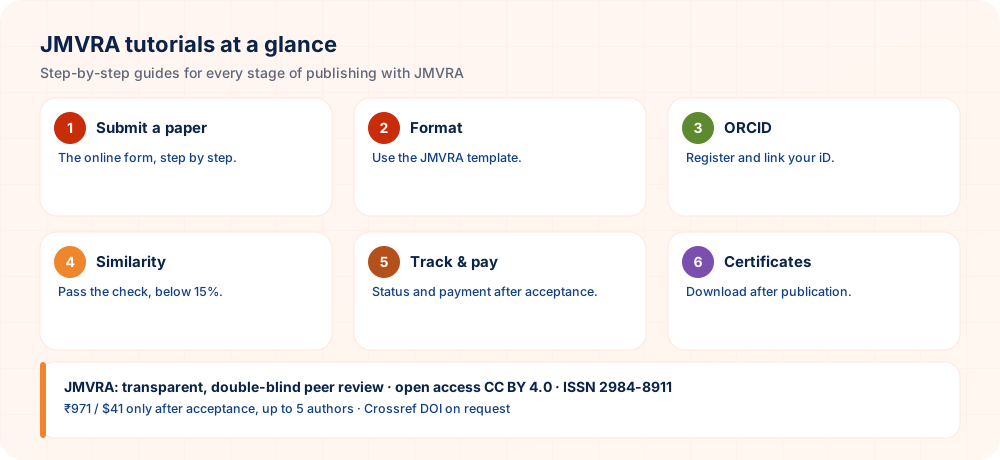
Ten guided walkthroughs take you from formatting your first manuscript through to checking your DOI and indexing once your work is published in JMVRA, a UGC Status & Parameters, international publishing practice journal.
Not sure where to submit yet? Start with How to Publish a Research Paper in a Journal, the wider guide to choosing a journal.
Steps to Submit Your Research Paper to JMVRA
The whole route from a completed manuscript to a confirmed submission.
Formatting Your Manuscript with the JMVRA Template
Fonts, margins, structure and citation style, set up properly from the start.
Registering and Linking Your ORCID iD
A five-minute task that safeguards every citation you will ever receive.
Avoiding Plagiarism & Passing the Similarity Check
Practical rewriting and citation habits that keep your score below the threshold.
Completing Payment for Your Publication Fee
How to pay securely, obtain your invoice, and respond when a payment fails to confirm.
Tracking Your Paper's Status
Understanding the status stages and deciding when to follow up.
Responding to Peer Review Comments
How to build a response document that makes re-review quicker.
Verifying Your DOI & Indexing Status
A self-check in six steps to confirm that your paper is live and can be found.
Downloading Your Publication Certificate
Obtaining your certificate and asking for corrections where needed.
Using the Cost Calculator
Obtain a precise, itemised fee before you submit anything.
All Tutorials, One Step at a Time
Select any card above to go directly to its guide, or scroll to read all ten below.
Steps to Submit Your Research Paper to JMVRA
This guide covers the full route from a finished manuscript to a confirmed submission that has been screened. If your manuscript is not yet formatted, complete Tutorial 2 first.
- 1
Finalise your manuscript
Make sure your file follows the JMVRA template: the required section order, one citation style used consistently, and an abstract of 150–250 words. The full specification has the details.
- 2
Collect details of your co-authors
For each author, note the full name, designation, institutional affiliation and email, plus an ORCID iD if there is one. Missing co-author details are the leading cause of delays at initial screening.
- 3
Go through the submission checklist
Before opening the portal, go through the 12-point Submission Checklist. It takes five minutes and prevents most rejections before they occur.
- 4
Enter the submission portal
Visit the online submission portal. There is no fee for creating an account.
1Paper2Authors3Address4SubmitPaper Details Step 1 of 4Full title of your research paperPaste your complete abstract here (100–300 words recommended)e.g. Machine Learning, Neural Networks (comma-separated)Research Paper(Select research area)Choose FileNo file chosenAccepted: .doc, .docx or .pdf. Max 10 MB.
NextThis mock-up of the JMVRA submission portal shows Step 1 of 4, which collects the paper title, abstract, keywords, research type and manuscript file; the Author, Address and final Submit steps come afterwards.
- 5
Fill in the title, abstract and keywords
Enter the final title, abstract and 5–8 keywords just as the manuscript has them, so the metadata matches your file. Pick the proper Research Type (Research Paper, Review Article, Case Study, etc.) and Research Area. Because JMVRA is a multidisciplinary, UGC Status & Parameters journal open to every subject, select whichever area comes closest to your field. If two areas seem equally close, choose the one your main readers would search under.
- 6
Attach your manuscript file
Attach the
.doc,.docxor.pdffile, keeping it below 10 MB. This is Step 1 of the 4-step portal pictured above, and Authors, Address and the final Submit step come next.Save the file asSurname_Title.docx; this lets the editorial team link your upload to your form entry straight away. - 7
Review and submit
Check every field carefully before submitting the form, and avoid refreshing or leaving the page while it processes.
- 8
Save your confirmation
A confirmation email arrives with a manuscript reference number. Keep it safe, as you need it to track your paper's status.
Formatting Your Manuscript with the JMVRA Template
Proper formatting has more influence than anything else on how quickly your paper passes initial screening.
- 1
Choose page and font settings
Use A4 page size with 1-inch margins on every side, Times New Roman 12pt for body text, 14pt bold for headings, 1.5 line spacing and justified alignment.
- 2
Arrange sections in the required order
Title Authors & Affiliation Abstract & Keywords Introduction Methodology Results & Discussion In Summary Acknowledgement References. See the full structure.
- 3
Craft a title and abstract that can be found in searches
Put your method, domain and application in the title. Keep the abstract to 150–250 words and state actual findings with figures instead of writing "results are discussed."
- 4
Select a single citation style and keep to it
Select IEEE, APA or MLA. Each in-text citation needs a matching entry in the reference list, and the reverse also holds. Consult Citation & Referencing Styles.
- 5
Give every figure and table a caption
Number figures and tables in sequence, caption each, and mention each at least once in the main text. Create tables as editable Word tables and not as pasted images.
- 6
Proofread using the checklist
Go through the Submission Checklist a last time before you save the file for upload.
Registering and Linking Your ORCID iD
An ORCID iD gives you, as a researcher, a lasting identifier, just as a DOI gives your paper one. It prevents your citations from being scattered across several author records.
- 1
Visit orcid.org and sign up
Open a free account using your name, email and institutional affiliation.
- 2
Settle on a single standard form of your name
Decide precisely how your name will appear on all future papers (for instance, always "Rajesh Kumar," never switching to "R. Kumar") and keep to it throughout your career.
On this page, hardly any other choice affects your long-term citation count as strongly as this one. - 3
Fill in your public profile
Enter your present institution and any past publications you have; this immediately helps tell you apart from other researchers whose names are similar.
- 4
Give your ORCID iD when you submit
From now on, put it in the author details section of each JMVRA submission.
- 5
Add the DOI to ORCID once published
Once the paper is published, put its DOI on your ORCID works list; numerous databases can do this for you automatically through the CrossRef/ORCID auto-update link.
Avoiding Plagiarism & Passing the Similarity Check
Each submission is checked for similarity before a reviewer sees it. Most papers that get flagged are not deliberate plagiarism; they stem from careless paraphrasing or background sections with too few citations. Keeping a log of sources while you read makes honest citation much easier.
- 1
Base your literature review on understanding and not on copying
Read a source, close it, and then put down what you understood in your own words. Do not paraphrase sentence by sentence with the source open beside you, because that yields the near-identical sentence structure that similarity tools flag most strongly.
- 2
Use quotations sparingly, always inside quotation marks
Should you need an author's exact words, quote them directly in quotation marks and add a citation. Exact wording copied without marks counts as plagiarism, whatever the intention.
- 3
Do not reuse your earlier text without disclosing it
Using large portions of your own previously published work without citing it amounts to self-plagiarism, and it is handled like any other similarity violation.
- 4
Cite while writing, not afterwards
Insert the citation when you use a source's idea instead of reconstructing it from memory at the end. That is how references end up dropped by accident, which weakens the paper and raises its apparent similarity.
- 5
When flagged, rework the specific sections instead of simply resubmitting
A similarity flag sends back identified sections for revision. Rewrite them from understanding (Step 1) and avoid swapping in a few synonyms, since surface-level word substitution is easy to detect and is treated just like the original flag.
Completing Payment for Your Publication Fee
Payment is requested only once your paper has been accepted by the editors, and never earlier.
- 1
Wait until the acceptance email arrives
Your acceptance email carries a secure payment link and the precise amount due: ₹971 INR for Indian authors, $41 USD international.
- 2
Check the amount using the Cost Calculator
If you added optional extras, compare the total with the Cost Calculator to avoid surprises.
- 3
Use only the official link to pay
Pay only through the link in your official acceptance email. Indian authors can use UPI, net banking and cards; overseas authors can use card and international wire.
Never pay through a link that arrives in an unsolicited email or from a third party; payment is collected only after the editorial office itself confirms acceptance. - 4
Keep a record of your transaction reference
Take a screenshot or write down the transaction/UTR number right after payment.
- 5
Do not pay again if confirmation takes more than a few hours
Email [email protected] giving your transaction reference and manuscript number. A delayed confirmation callback is usually the cause, not a lost payment.
Tracking Your Paper's Status
- 1
Find your manuscript reference number
It appears in the confirmation email you received on submission.
- 2
Go to the tracking portal
Visit Track Your Paper and type in your reference number.
- 3
Interpret the status stage
The stages run in this order: Submitted then Under Screening then Under Review then Revision Requested then Accepted then In Production and finally Published. Each stage is explained in the Help Center.
- 4
Send a reminder only when it is truly late
Email and WhatsApp carry the acceptance or rejection notice. If the status stays unchanged for several weeks, email the editorial team with your reference number.
Responding to Peer Review Comments
A well-organised response document is the quickest way through re-review.
- 1
Read all comments before you write a word
See everything both reviewers raised before you begin editing the manuscript.
- 2
Number every comment in the response document
Use a plain numbered list (Comment 1, Comment 2) that follows the reviewer's own numbering where one exists.
- 3
Say precisely what you altered for every point
A specific reply reads "Section 3.2 was revised to clarify the sampling method (page 6, highlighted)"; a vague one reads "addressed as suggested."
- 4
If you disagree with a point, explain why instead of ignoring it
Support your reasoning with evidence or literature. If a comment gets no reply, it looks like an oversight and not a considered decision.
- 5
Mark the changes in the revised manuscript
Turn on track changes or use a highlight colour, so that the editor and reviewers can quickly match your edits with the response document.
- 6
Send both files back together
Submit the revised manuscript and the response document as a pair.
Verifying Your DOI & Indexing Status
Carry out this check for each paper you publish. It takes ten minutes, and finding metadata errors early makes them cheap to fix. More background is in Indexing & Abstracting. A habit of checking soon after publication keeps small mistakes from spreading to other databases.
- 1
Confirm that your DOI resolves
Enter
https://doi.org/and then your DOI in a browser; it should open your article page. Wait 72 hours after publication before testing. - 2
Inspect the CrossRef record
Look up your DOI at search.crossref.org. Check the title, every author name, the affiliations, journal, ISSN, volume/issue/pages, date and licence.
- 3
Search Google Scholar
Search for your exact title within quotation marks. Wait 2–6 weeks before expecting it to show, and add the paper to your Google Scholar profile by hand.
- 4
Check the aggregators
Use your DOI or title as a search term at openalex.org, scilit.com and explore.openaire.eu to see whether it appears.
- 5
Check the record for the journal itself
Search for ISSN 2984-8911 on portal.issn.org and for JMVRA in road.issn.org.
- 6
Connect your identity
Put the DOI in your ORCID record, and take ownership of the article on ResearchGate.
Downloading Your Publication Certificate
- 1
Wait for the email confirming publication
It is sent as soon as your paper goes live with its DOI.
- 2
Follow the certificate download link
Every listed author gets an individual certificate, not only the corresponding author.
- 3
Review the details before you use it
Before presenting the certificate to any official body, confirm that your name, the paper title, ISSN, volume/issue and DOI are correct.
- 4
Tell us about any mistake straight away
To get a corrected certificate, write to [email protected] giving the right spelling together with your DOI.
Using the Cost Calculator
- 1
Open the calculator
Open the Cost Calculator; no login is needed.
- 2
Choose your author category
Either Indian (₹971 INR) or International ($41 USD); pick the one that applies.
- 3
Include optional extras if wanted
Add a hard copy, a plagiarism report or other extras, should you need them.
- 4
Review the itemised total
This is the precise amount you will be asked to pay after acceptance, so keep it for your records.
Publishing in a UGC Status & Parameters, Low-Cost Journal
Each tutorial here follows the real submission portal for JMVRA (ISSN 2984-8911), a multidisciplinary, UGC Status & Parameters journal that follows Scopus journal indexing standards and publishes research for only ₹971 INR (Indian authors) or $41 USD (foreign authors).
These ten guides, covering everything from manuscript formatting and ORCID registration to DOI verification, are the route by which thousands of authors have published in the multidisciplinary, monthly JMVRA, a UGC Status & Parameters journal. JMVRA takes all subjects, supports Crossref DOI, and is indexed in Google Scholar and other major academic databases; following the submission, formatting and verification steps above therefore decides how soon your work can be cited, found and kept permanently. With transparent peer review and an article processing charge that is among the lowest for UGC Status & Parameters journals in India, the tutorials are meant to carry a first-time author from a completed manuscript to a verified, indexed publication.
Suggested Sequence for First-Time Authors
- Apply the JMVRA template — see tutorial 2
- Run the similarity check — aim for under 15%
- Get your ORCID iD — and connect it
- Send in your paper — tutorial 1
- Track and respond — decisions by email and WhatsApp
Frequent Problems and Their Solutions
| Problem | Fix |
|---|---|
| Template layout breaks | Paste without formatting, then apply the styles |
| Similarity too high | Reword the matched passages and add citations |
| Payment not confirmed | Provide the transaction reference together with your paper ID |
| Unable to locate the paper status | Try the tracking page or write to the editorial office |
Practical Tips for Working Through Author Tutorials
Step-by-step guides are most effective when you follow them in sequence and keep your own notes. These suggestions help first-time authors move through the process with fewer interruptions.
- Follow the order given. Complete earlier tasks, such as account setup and identifier linking, before reaching submission steps. Skipping ahead often means returning to fix something you missed.
- Keep the guide open beside you. Use two windows or two devices so you can tick off each step as you perform it. This avoids guessing from memory and reduces slips.
- Practise on a draft first. Where possible, fill in forms with test text in a separate document before entering final answers. You will notice missing details without risking a half-complete record.
- Write down what each screen asked. Save your answers, file names and reference codes in a personal checklist. If a step fails, you can show support exactly what you did.
- Report unclear instructions. If a tutorial does not match what you see, message the editorial office with a screenshot. Feedback of this kind helps improve the guidance for the next author.
Work through the tutorials in order, keep notes of each step, and ask for help with screenshots when anything differs.
Questions Researchers Often Ask
Which subjects are covered in the JMVRA tutorials?
Topics include how to submit a paper, formatting to the JMVRA template, registering and linking an ORCID iD, tracking progress, checking your DOI and indexing, and downloading the publication certificate.
What is the duration of the "How to Submit" tutorial?
Roughly 10 minutes over 8 steps, running from manuscript preparation to completing payment after acceptance.
Is an ORCID iD required for publishing with JMVRA?
An ORCID iD is optional, though getting one is a good idea; it takes roughly five minutes and brings together all the citations you will ever earn. Linking it early means later papers are attributed to the same record.
Where should I begin among the tutorials?
Begin by formatting your manuscript in the JMVRA template.
Is ORCID needed for submission?
It is advised, since it keeps your record correct.
Want to Apply These Steps?
Fees from ₹971 INR · UGC Status & Parameters · Crossref DOI if requested · International publishing practice.
What This Guide Covers
At-a-Glance Checklist
- Tutorial chosenFor your stage
- Template downloadedLatest version
- ORCID linkedTo your submission
- Payment after acceptanceOnly then
- Certificates savedEvery author
Your Paper's Journey at JMVRA, From Submission to Publication
- SubmitA paper ID is issued
- ScreenScope & similarity
- ReviewDouble-blind
- DecideEmail & SMS
- ReviseAnswer every point
- AcceptCopyright & fee
- ProduceDOI available on request
- PublishMonthly issue
How long review takes depends on the reviewers and on any revision required, so no set turnaround is promised; you are told of acceptance or rejection by email and WhatsApp.
Ready to Publish? Submit to JMVRA
JMVRA is aligned with UGC's Suggested Parameters for Choosing Peer-Reviewed Journals.
JMVRA is a Transparent, Peer-Reviewed, Open Access Journal (Refereed Journal). Following the discontinuation of the UGC and UGC-CARE journal listing, and in alignment with the latest UGC-CARE recommendations and guidelines, JMVRA is aligned with UGC’s Suggested Parameters for Choosing Peer-Reviewed Journals.
Helpful pages on jmvra.org
Key Terms
Subjects and search phrases this article addresses.
Related Reading
Further reading on the same theme from the JMVRA blog.
Company Policy
Read the guide RelatedJW Book: Self-Publish With ISBN and Global Reach
Read the guide RelatedJMVRA Peer Review Policy: Double-Blind by Experts
Read the guide RelatedHelp Center
Read the guide RelatedPublish Conference Proceedings as a JMVRA Special Issue
Read the guide RelatedRefund Policy
Read the guideKeep Reading on the JMVRA Blog
This guide belongs to the JMVRA journal blog, which offers practical advice on publishing, indexing, metrics and research integrity, written to be checkable instead of promotional.