
Typing out a 40-source reference list by hand wastes more time than almost anything else in preparing a manuscript, and it is easily avoided. A reference manager handles the citation formatting for you, so moving between IEEE, APA or MLA style means picking from a dropdown rather than retyping every entry. Setting it up before you begin writing saves the most effort.
How the Right Tool Genuinely Saves Time
Formatting is only part of it: a reference manager holds your whole reading library, lets you mark up PDFs, and, most importantly, refreshes every in-text citation and reference entry automatically whenever you add, delete or reorder a source — a thing hand-built lists regularly get wrong while a paper is being revised.
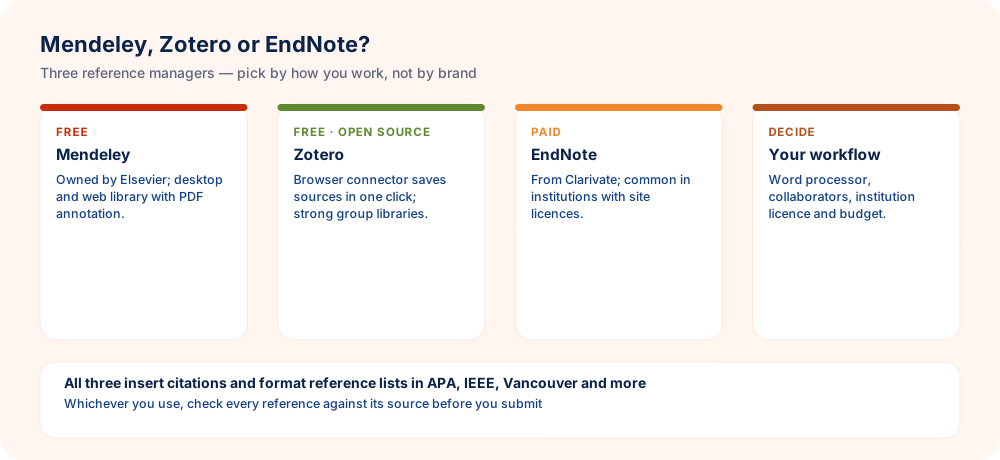
Mendeley
Brings reference management together with an integrated PDF reader and annotation features, and adds a social and discovery layer for locating related papers. The free tier comes with a limited amount of cloud storage. Elsevier owns it, so it fits neatly if you already work within Elsevier's ecosystem, although that is not necessary.
Zotero
Free and open-source, with none of its main features locked behind payment. A browser extension pulls citation data straight from journal pages, publisher websites and library catalogues in a single click. It is often suggested as the simplest starting point for newcomers thanks to its clear interface and a large citation style library maintained by its community. Try it on a handful of papers before committing your whole library.
EndNote
A long-standing, richly featured commercial product that universities frequently provide through institutional licences. It excels with very large libraries and intricate, extended research projects, and connects closely with Word for demanding formatting requirements.
Head-to-Head Comparison
| Tool | Cost | Best For |
|---|---|---|
| Mendeley | Free (capped storage) | Reference management together with PDF reading and annotation |
| Zotero | Free, open-source | Beginners, and one-click capture from the browser |
| EndNote | Paid (frequently via an institutional licence) | Huge libraries and complex projects that run for a long time |
Which Tool Is Right for You?
- New to this and short of funds — Zotero
- Looking for built-in PDF annotation — Mendeley
- Your institution supplies a licence and your project is large and long-running — EndNote
At-a-Glance Checklist
- Import by DOITidier records than typing them in
- One libraryDo not spread references over several tools
- Pick the styleWhichever citation style your journal requests
- Check the outputTools reproduce metadata mistakes, so proofread the list
A Reference Routine That Suits Any Tool
Regardless of the software, one routine keeps every reference correct, starting with the earliest literature search and ending at submission:
- Collect from the original source — import via the journal page, a database or a DOI instead of typing references
- Inspect each entry once — DOI, pages, issue, volume, journal, title, year and authors
- Sort by project — give each paper or thesis chapter its own folder or tag
- Keep PDFs and notes with each item — so you can recall, months afterwards, why a source was cited
- Use the plugin to insert citations — do not mix hand-typed citations with it
- Select the journal's required style — then change it within seconds if you submit somewhere else
- Read through the finished list — imported metadata is frequently incomplete or capitalised incorrectly
Citation Styles and Their Templates
| Style | In-text format | Typical fields |
|---|---|---|
| APA 7 | (Author, Year) | Business, education, psychology and social sciences |
| IEEE | [1] | Engineering, computer science |
| Vancouver | (1) or superscript | Medicine, health sciences |
| Chicago author–date | (Author Year) | Social sciences, history |
| Harvard | (Author Year) | Several variants; each institution may follow a different version |
Thousands of styles are available in all three tools, either via the Citation Style Language or through their own libraries. Our guides to APA format, IEEE format and citing a journal article may help.
Practical Tips for Choosing a Reference Manager
Picking software is easier when you test it against your real working habits rather than feature lists. These suggestions help you commit to one tool and avoid painful migrations later.
- Trial with a real chapter. Import the bibliography of a paper you are actually writing and insert citations into the draft. Genuine friction appears quickly, whereas demonstration files always look smooth.
- Ask what your lab already uses. Shared libraries are far simpler when supervisors and co-authors work in the same tool. Check departmental habits and any institutional licence before you invest hours in a personal setup.
- Test your word processor first. Confirm the plugin works with the exact version of the editor you use, including on the machine you travel with, because broken add-ins cause the most last-minute stress.
- Keep exports as insurance. Save a plain bibliographic export file occasionally. If you ever switch tools or lose access, that file lets you rebuild your library without retyping every entry.
- Clean records on entry. Check author names, journal titles and page ranges when you add an item. Automatic metadata is helpful but imperfect, and a tidy library prevents repeated corrections in every manuscript.
Choose the tool that fits your collaborators and your writing software, test it on live work, and always keep a backup export.
Questions Researchers Often Ask
The Parts of a Research Paper
Usual proportions for an empirical paper — guidance rather than a fixed rule.
- BackgroundExplain the gap in 1–2 sentences.
- ObjectiveWhat question or hypothesis is being tested.
- MethodsThe study's design, the data used and the tools applied.
- ResultsPrincipal findings backed with figures.
- In SummaryWhat it means.
- Key Terms4–6 searchable terms.
Since it should hold all five parts, plan on about 150–250 words for the abstract and write it last. See JMVRA Publication Guidelines for the complete rules.
Ready to Publish? Submit to JMVRA
JMVRA is aligned with UGC's Suggested Parameters for Choosing Peer-Reviewed Journals.
JMVRA is a Transparent, Peer-Reviewed, Open Access Journal (Refereed Journal). Following the discontinuation of the UGC and UGC-CARE journal listing, and in alignment with the latest UGC-CARE recommendations and guidelines, JMVRA is aligned with UGC’s Suggested Parameters for Choosing Peer-Reviewed Journals.
Quick links across jmvra.org
Key Terms
Subjects and search phrases this article addresses.
Related Reading
Further reading on the same theme from the JMVRA blog.
Privacy Policy
Read the guide RelatedOpen-Process Peer Review
Read the guide RelatedResearch Areas
Read the guide RelatedOpenAlex or Google Scholar? Key Differences
Read the guide RelatedSEO for Journals Without Tricks
Read the guide RelatedDisclaimer
Read the guide From the blogMendeley Is Not an Index: Civil Engineering Guide
Read the article From the blogHow to Cite DOIs in APA, IEEE, Vancouver & Chicago
Read the article From the blogPublishing Electrical Engineering Research Affordably
Read the articleKeep Reading on the JMVRA Blog
Our JMVRA journal blog carries this guide along with other practical advice on publishing, indexing, metrics and research integrity, all written so that claims can be verified and nothing is promotional.