
Check That It Resolves, Then Compare the Metadata
To test a DOI, put the DOI string after https://doi.org/ in your browser's address bar and confirm you are sent to the right article's landing page. After that, verify the registered metadata — title, authors, publication date — against the article itself, using Crossref Metadata Search or Crossref Search. A DOI that leads to the wrong page, or whose metadata does not match, is a registration fault to report to the publisher. Keep a screenshot of the result when you report it, since that helps the publisher reproduce the problem.
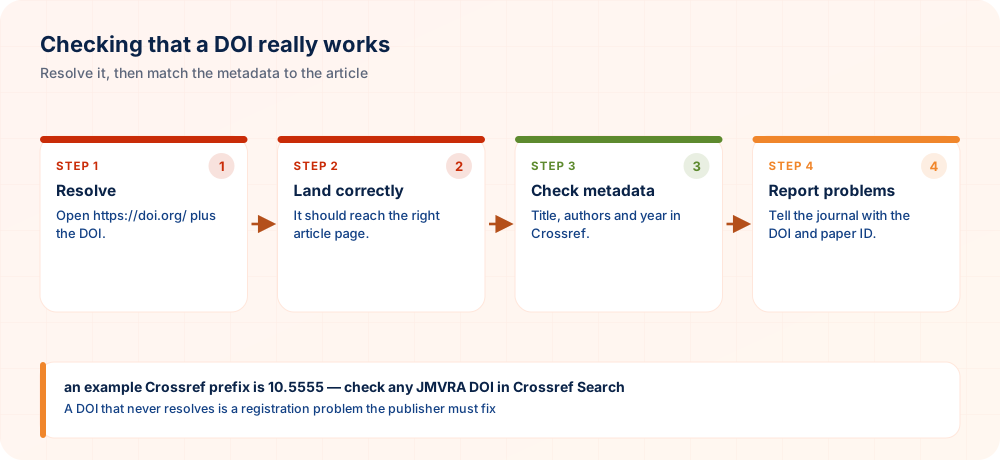
DOI Verification Steps
Obtain the precise DOI string
Copy it exactly — mistakes in punctuation are the commonest reason for a false "broken" report.
Follow the resolver link
Go to https://doi.org/[the-doi] and see whether the redirect works.
Check the landing page
Does it arrive at the right article, rather than a homepage or an error page?
Search Crossref metadata
Make sure the registered title, authors and date agree with the real article.
Check registration status
A DOI that does not resolve whatsoever might never have been registered, despite appearing in print.
Get in touch with the publisher if it is broken
Pass on the exact string and the particular problem you saw.
DOI Problems Often Found
- A typo in the printed DOI string (one wrong character stops resolution)
- A DOI shown on a certificate but never actually registered
- Landing page URL out of date after the site was reorganised, which breaks the redirect
- Metadata mismatch — the registered title or authors differ from the live article
- The DOI resolves, but to a completely different article
Steps When a DOI Does Not Work
As registrant of the DOI, the publisher must fix the landing-page URL or metadata. Send the exact DOI string and describe the fault clearly: a redirect to the wrong place, mismatched metadata, or no resolution at all.
Fixing Broken DOIs in Your Reference List
A reference list full of dead links frustrates readers and weakens your paper. This routine helps authors and editors find problems early and repair them with minimal effort.
- Check in a single pass. Open every link in your reference list one after another before submission, ticking each off as it resolves. Doing it in one sitting makes patterns of error easier to notice.
- Compare the landing page details. After a link opens, confirm that title, authors and year agree with your citation. A working link to the wrong article is a more serious fault than a link that fails.
- Fix typing slips first. Most failures come from stray spaces, missing characters or punctuation attached to the end of the link. Correct those before concluding that the article itself is the problem.
- Search by title as a fallback. If a link fails, look the work up by title in a scholarly search tool and copy the current identifier. Publishers sometimes move content, and the register usually holds the updated address.
- Report persistent faults. When an identifier still fails, notify the publisher or journal with the exact link and a short description. Prompt reports help them repair the record for all later readers.
Check each identifier, compare the page with your citation, correct small slips yourself and report the stubborn faults to the publisher.
Tools to Verify DOIs
| Tool | Use |
|---|---|
| doi.org | Resolve a DOI |
| Crossref Search | View Crossref metadata |
| DataCite Search | View DataCite metadata |
| Reference managers | Import using the DOI, then compare |
Verifying Numerous DOIs in a Reference List
- Export the references including DOIs — out of your reference manager
- Test every DOI — a script or tool can assist
- Match the metadata — title and year
- Correct mistakes — ahead of submission
DOI Verification FAQs
How can I tell whether a DOI really resolves?
Add https://doi.org/ in front of it, open the link, and confirm you land on the correct article.
What does an error signify?
A typo, a DOI that was never registered, or a broken landing-page link — start by checking the exact string.
How do I check that the metadata matches?
Look it up in Crossref Metadata Search or Crossref Search and compare what appears with the real article.
What if the DOI of my own article does not resolve?
Email the journal's editorial office, quoting the precise DOI and explaining what goes wrong.
Is it possible for a DOI that worked to fail later?
It should not, when properly maintained — failures usually mean the publisher did not update the registration after a site change.
Does a DOI often lead to the wrong article?
It occurs now and then because of registration errors — report it right away, as it harms citation accuracy.
Is it worth verifying a DOI before putting it on a CV?
Yes, it takes only seconds and avoids an invalid reference in an important document.
Does JMVRA supply DOIs that work?
Yes, through the optional Crossref add-on — check any particular one at doi.org.
What is meant by “DOI not found”?
The DOI could be mistyped, not yet registered, or never registered.
Does every reference need a DOI?
Add DOIs wherever they exist; not every source has one.
Related Searches
Verification From the Source
Publishing with a DOI You Can Rely On
Through the optional Crossref DOI add-on, JMVRA registers real identifiers that you can check and that resolve properly.
Submit Paper OnlineAt-a-Glance Checklist
- Whole link testedhttps://doi.org/…
- Correct articleNot a home page
- Metadata agreesTitle, authors, year
- Prefix owner verifiedIn Crossref
- Fault reportedIncluding details
Anatomy of a JMVRA DOI
Resolver → prefix 10.5555 (an example Crossref prefix) → suffix: journal, volume 14, issue 9, article identifier. A format example: doi.org/10.5555/12345678
Any JMVRA DOI can be looked up in Crossref Search or the Crossref journal record, as you like.
Ready to Publish? Submit to JMVRA
JMVRA is aligned with UGC's Suggested Parameters for Choosing Peer-Reviewed Journals.
JMVRA is a Transparent, Peer-Reviewed, Open Access Journal (Refereed Journal). Following the discontinuation of the UGC and UGC-CARE journal listing, and in alignment with the latest UGC-CARE recommendations and guidelines, JMVRA is aligned with UGC’s Suggested Parameters for Choosing Peer-Reviewed Journals.
Quick links across jmvra.org
Key Terms
Subjects and search phrases this article addresses.
Related Reading
Further reading on the same theme from the JMVRA blog.
Free Zenodo DOIs: Uses and Limits
Read the guide RelatedImproving Online Discovery of a Research Paper — DOI, Metadata, Google Scholar and OpenAlex
Read the guide RelatedZenodo DOI or Journal Crossref DOI? Choosing Right
Read the guide RelatedORCID iD: The Researcher ID Everyone Needs
Read the guide RelatedPublishing an Academic Book: ISBN, DOIs & Process
Read the guide RelatedISBN, ISSN and DOI: Three Identifiers Compared
Read the guideKeep Reading on the JMVRA Blog
Our JMVRA journal blog carries this guide along with other practical advice on publishing, indexing, metrics and research integrity, all written so that claims can be verified and nothing is promotional.