

A Google Scholar profile is frequently the first page that appears when someone searches for you as a researcher. Built with care, it displays your work correctly; left alone, it may show papers by others or divide your citations. This guide covers how to create a Google Scholar profile, verify your institutional email, match your publications, merge duplicates and keep the record accurate.
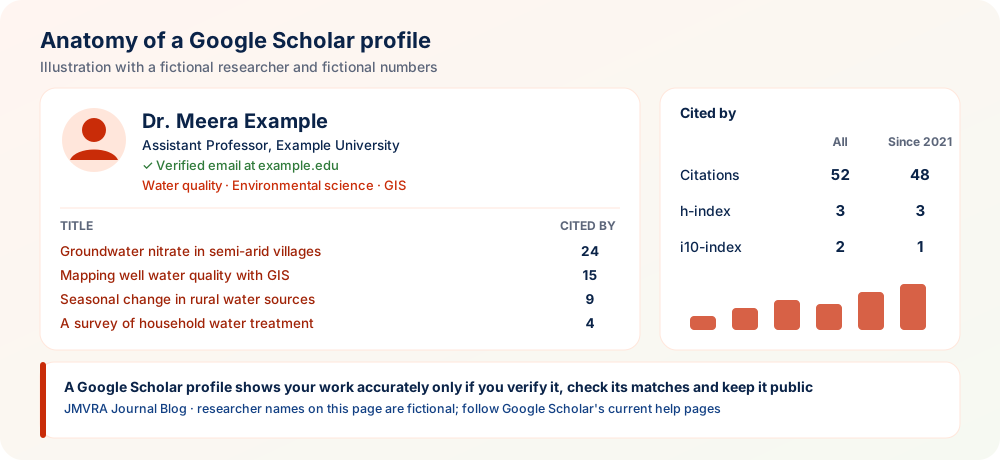
Understanding the Google Scholar Profile
A Google Scholar profile is a public page, free of charge, that shows your publications as found by Google Scholar along with citation counts for each and summary metrics: total citations, h-index and i10-index. Editors, reviewers, hiring committees and collaborators often check it first. A tidy profile shows your work correctly, while a neglected one may display the wrong papers or spread your citations over duplicates.
Before You Start
- You need a Google account (a personal one will do, and the profile stays with you if you change jobs).
- Your institutional email must be accessible for verification.
- Your list of publications, with DOIs if available, for checking matches.
- Every version of your name that you have published under.
Steps to Create a Google Scholar Profile
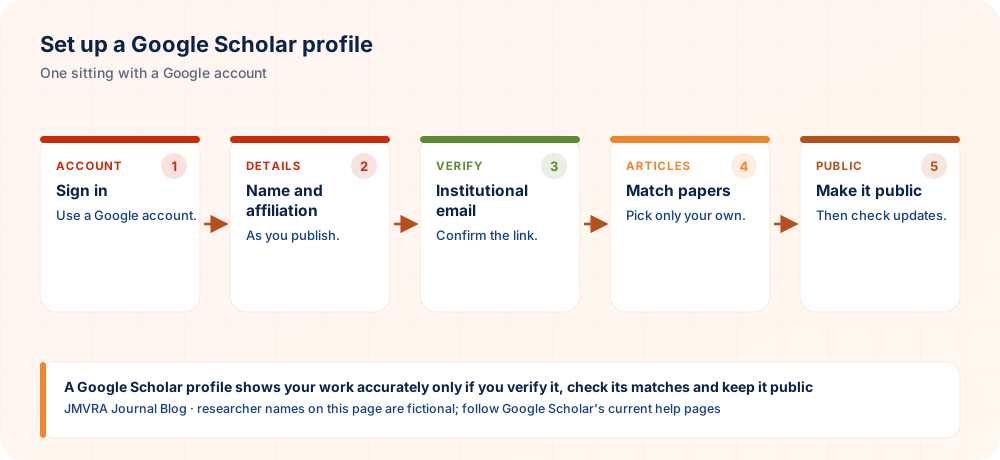
| Step | What to do | Tip |
|---|---|---|
| 1. Open My profile | Open Google Scholar Citations and log in. | Pick the account you intend to keep for the long run. |
| 2. Your name and affiliation | Type your name the way you publish it, plus your present institution and position. | Make the affiliation brief and standard. |
| 3. Verification email | Type in your institutional email. | Once verified, the profile reads “Verified email at your-institution”, which adds credibility. |
| 4. Research interests | Include several specific research areas. | Precise labels like “Groundwater quality” make you easier to find. |
| 5. Add articles | Pick from article groups or look up individual papers. | Choose only papers that you authored. |
| 6. Update setting | Select automatic updates, or have updates sent for review by email. | Email review keeps wrong papers from being added. |
| 7. Make public | Check the box that makes your profile public. | Public profiles alone show up in Google Scholar search results. |
Institutional Email Verification
Once you add an institutional email, Google Scholar emails a verification link. After you confirm it, the profile displays a verified email domain, a plain and visible sign of your link with that institution. After a move, add and verify the new email.
Getting Your Publications Matched Properly
Google Scholar proposes articles from your name, so people with common names often see other authors’ papers suggested. Review every suggestion, checking authors, journal and year, and add only your own work. When a paper is absent, search by title or add it by hand. If it still cannot be found, make sure the journal’s article page carries proper metadata, as Google Scholar reads article pages and not only PDFs. Fixing metadata at the source helps every reader, not just your profile.
Dealing with Duplicates and Errors
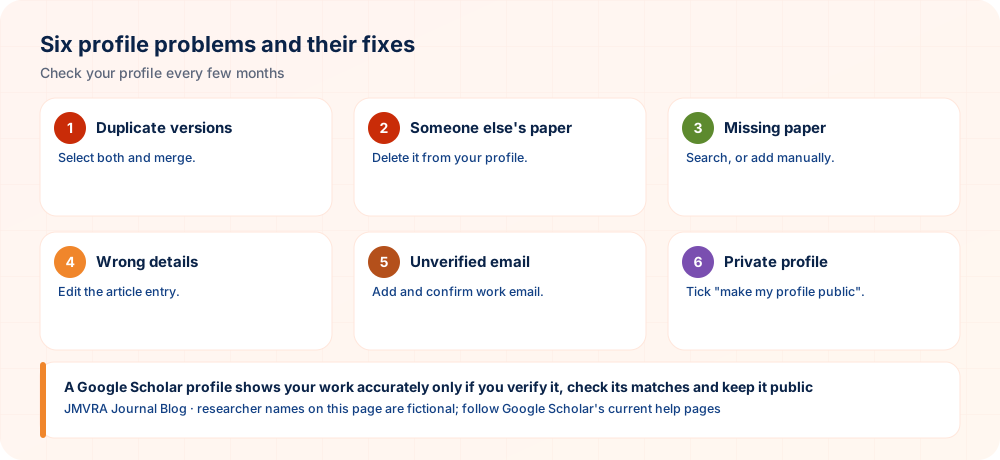
| Problem | Fix |
|---|---|
| Two copies of one paper | Tick both and press Merge; their citations are added together. |
| A paper by someone else | Tick it and remove it from your profile. |
| Incorrect title, year or journal | Open the article within your profile and change its details. |
| Citations look too few | Look for duplicates not yet merged; share the DOI link when passing on your paper. |
| Paper never appears | Make sure the article page is public and shows the title, authors and PDF link. |
Understanding Your Metrics
| Metric | Meaning | Example (fictional) |
|---|---|---|
| Citations | How often your listed works are cited in all, according to Google Scholar. | 52 in all years |
| h-index | The biggest number h for which h of your works are each cited at least h times. | 3 papers, each with at least 3 citations |
| i10-index | How many of your works have 10 or more citations. | 2 works |
| “Since” column | The same metrics, counting only citations from the past five years. | Shown next to “All” |
Because Google Scholar draws on more sources, its counts are usually above those of Scopus or Web of Science. Compare like with like. Read how to increase your h-index ethically.
Optimise the Profile
- Choose a clear photo and give your complete institutional title.
- Point to your own website, whether a university page or an ORCID record (see ORCID iD for researchers).
- Link to collaborators that have profiles of their own, letting readers follow your network.
- Follow your own profile to receive alerts when new citations appear.
- Put the profile link in your CV, email signature and applications.
A good profile shows your work clearly, but it will not raise citations alone. Read how to increase citations.
Neglected and Well-Kept Profiles
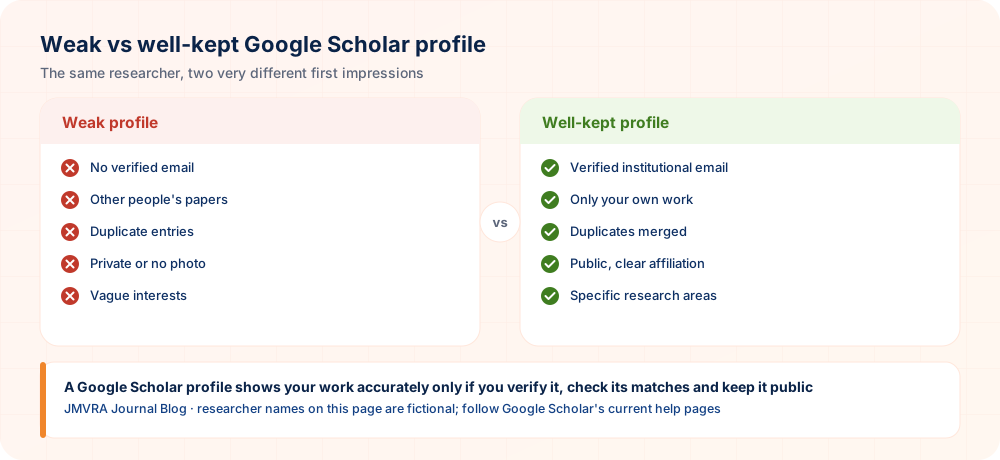
Readers spot it when a profile includes other people’s papers or leaves duplicates. A profile that is kept up, with a verified email, specific interests and clean records, is more credible.
What Not to Do
Never claim papers you did not author, post fake “papers” to inflate counts, or take part in citation-exchange schemes. Detection of such manipulation is possible, and your reputation may suffer. Only an honest profile is worth having.
JMVRA Papers on Your Profile
Because JMVRA articles are Google Scholar indexed, a published and indexed paper can show on your profile and its citations count toward your Google Scholar metrics. After publication, check the match and merge duplicate versions. The 11.25 figure for JMVRA is a value based on Google Scholar’s h-index; read how JMVRA calculates its impact factor.
JMVRA in brief
- Review: transparent, double-blind peer review, normally by at least two subject experts. Specialist reviewers assess your paper, and you receive the acceptance or rejection decision by email and WhatsApp.
- Fee: Submitting and reviewing cost you nothing. The fee, ₹971 INR for authors in India and $41 USD for authors abroad, falls due when your paper is accepted.
- Access: anyone can read the papers under CC BY 4.0 open access. ISSN 2984-8911, monthly issues, submissions whenever you are ready, and a Crossref DOI if requested.
- Indexing: JMVRA appears in Google Scholar and is registered with Crossref and the ISSN Portal / ROAD; it is not currently indexed in Scopus, Web of Science or DOAJ.
Share Your Research Through JMVRA
Bring your research to JMVRA
JMVRA (ISSN 2984-8911) is a peer-reviewed, open access journal spanning many disciplines. Submission is free. Specialist reviewers assess your paper, and you receive the acceptance or rejection decision by email and WhatsApp.
- 1. Prepare according to the guidelines
- 2. Submit online
- 3. Peer review
- 4. Decision by email & WhatsApp
- 5. Publish with open access
Your At-a-Glance Checklist
- VerifiedInstitutional email
- Own workJust your own papers
- MergedNo duplicates
- UpdatesReviewed through email
- PublicAppears in search
- ReviewOnce every few months
Practical Tips for Maintaining Your Scholar Profile
Creating a profile is easy; keeping it accurate takes regular attention. These routines help your publication list stay correct, professional and useful to colleagues, employers and collaborators.
- Choose one name format. Decide how your name appears in publications and use it consistently. Keep variants, such as initials with surnames, in mind so that older papers are matched to you.
- Write a clear short description. Add your field, institution and main interests in a single plain sentence. A concise description helps visitors understand your work in moments.
- Review suggested additions carefully. When the system proposes new articles, accept only those that are truly yours. Wrongly attached papers can mislead readers and embarrass you during evaluations.
- Add a profile photo and link. A recognisable photo and a link to your institutional page help others confirm you are the right researcher among people with similar names.
- Schedule a periodic tidy-up. Set a reminder to inspect the profile every few months. Merge duplicates, remove errors and confirm that visibility settings still match your preference.
A consistent name, a careful review of suggestions and a regular tidy-up keep your profile accurate and credible.
Questions Researchers Often Ask
In Summary
Setting up a Google Scholar profile well takes about an hour, and upkeep needs a few minutes every few months. Verify your institutional email, choose only your own papers, merge duplicates, keep the profile public and cite it in your CV. An accurate, honest profile shows your research as it deserves.
Have a manuscript to share? Submit it to JMVRA
JMVRA (ISSN 2984-8911) is a peer-reviewed, open access journal spanning many disciplines. Submission is free. Specialist reviewers assess your paper, and you receive the acceptance or rejection decision by email and WhatsApp.
- 1. Prepare according to the guidelines
- 2. Submit online
- 3. Peer review
- 4. Decision by email & WhatsApp
- 5. Publish with open access
References and Further Resources
Google Scholar Profile Overview
- Sign inWith a Google account
- DetailsName, affiliation
- VerifyInstitutional email
- MatchYour own papers only
- PublicThen maintain
Related: h-index guide · GS indexing · Submit Paper.
Ready to Publish? Submit to JMVRA
JMVRA is aligned with UGC's Suggested Parameters for Choosing Peer-Reviewed Journals.
JMVRA is a Transparent, Peer-Reviewed, Open Access Journal (Refereed Journal). Following the discontinuation of the UGC and UGC-CARE journal listing, and in alignment with the latest UGC-CARE recommendations and guidelines, JMVRA is aligned with UGC’s Suggested Parameters for Choosing Peer-Reviewed Journals.
Related pages on jmvra.org
Key Terms
Subjects and search phrases this article addresses.
Related Reading
Further guides on Google Scholar, citations and researcher profiles.
Grow Your h-index Ethically: 10 Strategies
Read the guide Related15 Ethical Ways to Grow Your Paper's Citations
Read the guide RelatedA Step-by-Step Walkthrough to Get Your Research Paper Indexed in Google Scholar
Read the guide RelatedCreating and Using Your ORCID iD
Read the guide RelatedHigh Impact Factor Journals: Verify Metrics First
Read the guide RelatedGetting a Published Paper Into Google Scholar
Read the guideKeep Reading on the JMVRA Blog
Published on the JMVRA journal blog, this guide gives practical direction on publishing, indexing, metrics and research integrity, with a focus on what can be verified instead of on promotion.