
Software for Following a Manuscript from Start to Finish
A journal management system (JMS) is software that guides a manuscript through submission, editorial screening, peer review, revision, decision, production and publication, including DOI registration and metadata deposit where these are integrated, and it keeps a full, time-stamped log of each step. The alternative is a swelling heap of emails and spreadsheets that grows unmanageable as submissions increase, and that makes it impossible to rebuild the history of one manuscript months afterwards. Whichever tool is used, consistent record keeping is what protects both editors and authors.
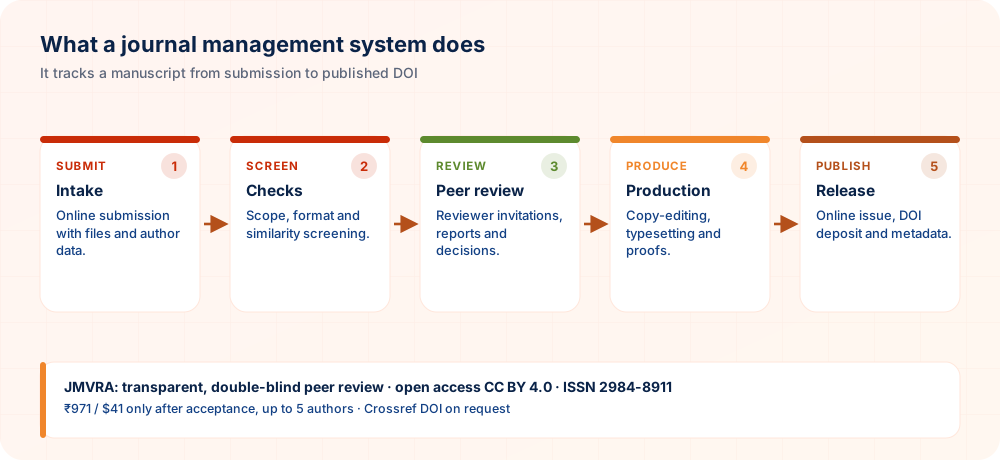
The Editorial Workflow Handled by a JMS
Roles Supported by a Journal Management System
Author
Sends in work, follows its status, uploads revisions and downloads records, with no view of other authors' manuscripts.
Editor
Allocates reviewers, monitors deadlines, logs decisions and oversees the whole pipeline.
Reviewer
Gets assignments and files reports and recommendations inside the system, normally without seeing who the author is.
Production
Takes care of typesetting, proofing and preparing the final files before publication.
Finance/Administrator
Monitors payment status wherever a publication fee applies, and administers user accounts and permissions.
Editor-in-Chief
Has the last word on decisions and supervises the full editorial pipeline.
Where Open Journal Systems (OJS) Belongs
Open Journal Systems (OJS), developed by the Public Knowledge Project, ranks among the most widely adopted journal management systems anywhere: it is free, open-source and used by thousands of independent journals. It is one particular implementation of the category covered on this page and not a synonym for it. Other journals use commercial journal-management platforms or in-house systems that do the same basic work through a different interface and set of features. Knowing the category helps you read a journal's submission instructions with more confidence.
For an author, the software behind a journal rarely matters; what counts is a clear journal portal, a documented process, and a journal that actually follows the review policy it publishes.
Why a Purpose-Built System Is Important
- A complete, time-stamped history of each submission, review round and decision, with nothing stuck in a personal inbox
- Continuity for the institution: the editorial history outlasts staff changes instead of sitting in one person's email
- Well-structured metadata that supplies DOI registration and discovery services correctly from the start
- Access by role, so reviewer identities, author identities and financial data stay suitably apart
- An audit trail that an evaluator (DOAJ, an institution or a funder) can genuinely examine
Getting the Most from a Journal Management System
Software helps only when the team configures and uses it consistently. These suggestions are aimed at editors and administrators setting up or reviewing the system that carries manuscripts through the journal.
- Map your workflow before configuring. Sketch each stage a manuscript passes through and who acts at each step. Configuring the system to match a clear drawing is far easier than reorganising settings after authors arrive.
- Customise email templates carefully. Automated messages are often the only contact authors and reviewers have with the journal. Write them in polite, plain language, with clear next steps, and test every template before going live.
- Limit permissions by role. Give each person access only to what their task requires. Restricting rights protects confidential reviews, reduces accidental changes and makes it easier to see who did what.
- Back up and rehearse recovery. Schedule regular backups of both files and the database, and occasionally practise restoring them. A backup that has never been tested may fail exactly when it is needed.
- Train editors on a sample submission. Walk new editors and reviewers through a practice manuscript before they handle real ones. Short hands-on training reduces mistakes, shortens support requests and builds confidence in the process.
Design the workflow first, control access by role and protect your data, and the system will quietly support editors rather than complicate their work.
Features Worth Comparing
| Feature | Why |
|---|---|
| Double-blind support | Keeps identities hidden during review |
| Similarity check integration | Screening efficiency |
| Crossref deposit | DOI registration |
| OAI-PMH | Harvesting by indexes |
| Notifications by email and SMS | Keeps authors informed |
Security and Data Protection
Access control
Role-based permissions.
Backups
Regular and tested.
Updates
Software kept current.
Privacy
Share as little personal data as possible.
FAQs on Journal Management Systems
What does a journal management system do?
It is software that coordinates a manuscript's path from submission to publication, DOI and metadata, while keeping a complete record that can be audited.
Does a journal management system mean OJS?
OJS is a single well-known example of the category and not the only implementation.
Which roles does a journal management system usually cover?
Access depends on the role held by the user, whether that is Author, Editor, Reviewer, Production, Finance/Administrator or Editor-in-Chief.
Should authors learn about the software a journal uses?
No. Authors simply work with whichever submission portal the journal offers.
Will a journal management system make review quicker?
Not necessarily. How fast review goes depends on whether reviewers are available, not on the software.
Is it possible for one system to host several journals?
Yes. Many systems, OJS among them, allow installations with multiple journals.
Does a journal management system carry out DOI registration by itself?
Many connect with Crossref to deposit metadata, although the relationship with the DOI agency is usually handled separately.
How does a journal management system differ from a journal website?
The website is what the public sees, while the management system is the internal engine of the editorial workflow.
Must a journal have a management system in order to publish?
Very small operations can manage without one, but it becomes a practical necessity once volume rises.
Is a journal management system used by JMVRA?
The submission and review workflow of JMVRA runs through its own portal; refer to the current submission page and documentation for the exact process.
Is custom software needed to run a journal?
Not always; OJS and similar systems work well for many journals.
Does a JMS support more than one journal?
Many systems can host several journals within one installation.
Related Searches
Is Your Paper Ready to Submit Now?
Set aside the questions about infrastructure and move directly to your manuscript by submitting through the official JMVRA portal.
Submit Paper OnlineAt-a-Glance Checklist
- Roles setAuthor, editor, reviewer, admin
- Workflow chartedAn owner for each stage
- Records retainedDecisions and reports stored
- DOI depositPart of publication
- BackupsPlus a plan for succession
Your Paper's Journey at JMVRA, From Submission to Publication
- SubmitYou receive a paper ID
- ScreenScope & similarity
- ReviewDouble-blind
- DecideEmail & SMS
- RevisionReply to each point
- AcceptCopyright & fee
- ProduceA DOI if you ask for one
- PublishMonthly issue
How long review takes depends on the reviewers and on any revision required, so no set turnaround is promised; you are told of acceptance or rejection by email and WhatsApp.
Ready to Publish? Submit to JMVRA
JMVRA is aligned with UGC's Suggested Parameters for Choosing Peer-Reviewed Journals.
JMVRA is a Transparent, Peer-Reviewed, Open Access Journal (Refereed Journal). Following the discontinuation of the UGC and UGC-CARE journal listing, and in alignment with the latest UGC-CARE recommendations and guidelines, JMVRA is aligned with UGC’s Suggested Parameters for Choosing Peer-Reviewed Journals.
More useful pages at jmvra.org
Key Terms
Subjects and search phrases this article addresses.
Related Reading
Further reading on the same theme from the JMVRA blog.
Preprints: Where to Post and When
Read the guide RelatedRequesting Conference Publication With JMVRA
Read the guide RelatedDrafting a Peer Review Policy for a New Journal
Read the guide RelatedStart Here: JMVRA Blog Reading Paths
Read the guide RelatedOpenAlex or Google Scholar? Key Differences
Read the guide RelatedReviewer Policy
Read the guideKeep Reading on the JMVRA Blog
You are reading part of the JMVRA journal blog, a source of hands-on guidance about publishing, indexing, metrics and research integrity that aims to be verifiable, not promotional.