
Posting a preprint means sharing your findings before peer review has finished, sometimes many months ahead. Handled well, it secures priority and draws early feedback; handled carelessly, it may puzzle readers or conflict with a journal’s policy. This guide explains what a preprint is, where to post one, how to declare it, and what JMVRA’s own policy says. Reading it through before you upload anything can spare you awkward corrections later.
What Is a Preprint?
A preprint is a version of your research paper made public before it has gone through formal peer review. It is usually posted on a dedicated preprint server, which stamps it with a date and normally a DOI, so the work can be cited as an early public record.
Preprint, Manuscript and Version of Record Compared
| Version | What it is | Peer reviewed? |
|---|---|---|
| Preprint | The draft you make public ahead of, or while undergoing, peer review | No |
| Accepted manuscript | Your finished text once peer review is over, prior to journal typesetting | Yes |
| Version of record | The definitive published article, carrying the journal’s layout and its DOI | Yes |
Where to Post One
| Server | Best for |
|---|---|
| arXiv | Physics, maths, computing and other quantitative disciplines |
| SSRN | Economics, finance, law and the social sciences |
| bioRxiv / medRxiv | Life and health sciences |
| OSF Preprints | A broad range of fields, with subject-specific servers like PsyArXiv and SocArXiv among them |
| Zenodo | Open to every field, and commonly used for datasets and software too |
In most disciplines one server dominates, so find out which is the norm in yours before you decide.
Benefits and Risks
Benefits
- A timestamped record you can cite early on, which helps establish priority
- Comments from fellow researchers ahead of formal review
- Your work is visible straight away while review continues
Risks & trade-offs
- Because it has not been peer reviewed, readers need to approach it cautiously
- Results become public before the journal has made its decision
- Certain journals limit preprints, so look into this beforehand
Choosing a Licence
When you post, servers ask which licence you want. An open licence such as CC BY 4.0 allows others to reuse your work as long as they credit you, and it is consistent with the licence used by open access journals like JMVRA. Steer clear of licences that would clash with the journal you intend to submit to.
Start by Reading the Journal’s Preprint Policy
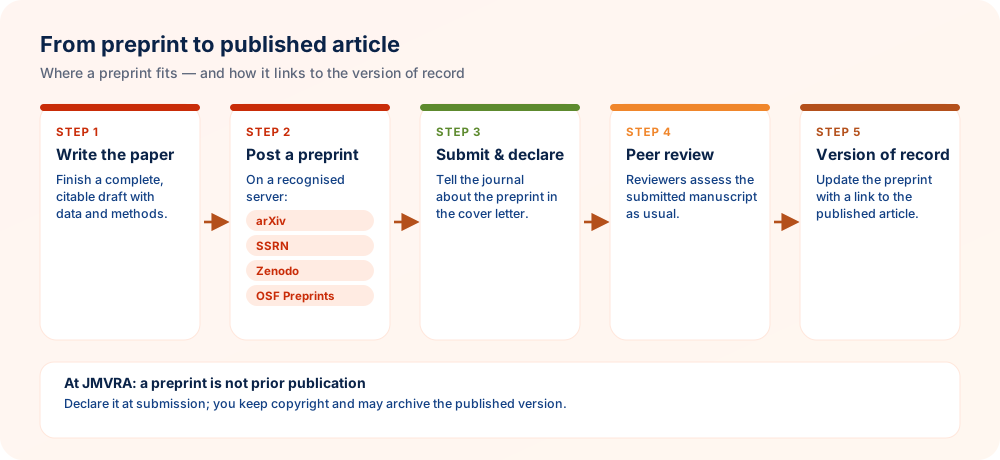
Most journals now openly allow earlier preprint posting, though practice differs — a handful still regard a preprint as prior publication. Read your target journal’s policy before you post, not once it is too late. If the wording is ambiguous, write to the editor and keep the reply.
Declaring a Preprint When You Submit
- Raise it in your cover letterName the server and date, and supply the preprint's DOI or link.
- Stay truthfulDo not conceal changes or overlap from the editor.
- Anticipate a similarity hitYour own preprint will be detected — the declaration accounts for it.
After Publication: Connect the Versions
When your article appears in print, edit the preprint record to point to the version of record (including its DOI) so readers are led to the reviewed text. Many servers provide a dedicated field for this.
JMVRA’s Policy on Preprints
Articles in JMVRA appear under CC BY 4.0, go through transparent, double-blind peer review, and every manuscript is screened for similarity (below 15%); a preprint of your own work that you have declared is taken into account during that screening. You can read the complete text in JMVRA’s Research Ethics, Data & Preprints policy.
At-a-Glance Checklist
- Journal policy checkedThe journal you are aiming for takes papers already posted as preprints
- Server chosenarXiv, SSRN, Zenodo, OSF or a subject-specific server
- Licence pickedA licence that remains compatible with journal publication
- Declared at submissionProvide the preprint's link and DOI
- Versions linkedAdd a link from the preprint to the published article
Selecting a Preprint Server
| Field | Examples |
|---|---|
| Physics, maths and computer science | arXiv |
| Life sciences | bioRxiv |
| Health sciences | medRxiv |
| Economics and the social sciences | SSRN, SocArXiv |
| Many fields | OSF Preprints, Zenodo, Research Square |
Select a server your peers read, review its moderation and licence choices, and ensure your intended journal takes preprints.
Citing Preprints and Keeping Them Current
- Make its status obvious — cite it as a preprint, naming the server and the identifier
- Favour the published version — cite the version of record as soon as it is available
- Connect them — put the journal's DOI on the preprint record
- Never upload revised versions with new results without saying so — use version numbers and describe what changed
Practical Tips for Posting and Managing a Preprint
A preprint can help your work reach readers sooner, but it must be handled with the journal's rules in mind. These suggestions keep versions tidy and your disclosure honest.
- Read policy before you post. Confirm that your target journal accepts manuscripts previously shared as preprints. A quick check beforehand avoids the awkward need to remove or explain a posting afterwards.
- Choose the licence deliberately. The licence on your preprint determines how others can reuse it and may interact with later publication terms, so select it thoughtfully rather than accepting a default.
- Label versions clearly. Use plain version labels and a short note describing what changed. Readers and indexing services can then tell an early draft from a revised, reviewed article.
- Declare the preprint at submission. Mention the posting and its address in your cover letter. Editors dislike discovering undeclared earlier versions during similarity checks, even when the posting itself is permitted.
- Link versions after publication. Add a note on the preprint pointing to the final article, so citations and readers are directed to the reviewed version of record.
Check policy first, declare the preprint when you submit, and link the versions together once the final article appears.
Questions Researchers Often Ask
Your Paper's Journey at JMVRA, From Submission to Publication
- Send paperPaper ID provided
- ScreenScope & similarity
- ReviewDouble-blind
- DecideEmail & SMS
- ReviseAddressing each comment
- AcceptCopyright & fee
- ProduceDOI offered upon request
- PublishMonthly issue
How long review takes depends on the reviewers and on any revision required, so no set turnaround is promised; you are told of acceptance or rejection by email and WhatsApp.
Ready to Publish? Submit to JMVRA
JMVRA is aligned with UGC's Suggested Parameters for Choosing Peer-Reviewed Journals.
JMVRA is a Transparent, Peer-Reviewed, Open Access Journal (Refereed Journal). Following the discontinuation of the UGC and UGC-CARE journal listing, and in alignment with the latest UGC-CARE recommendations and guidelines, JMVRA is aligned with UGC’s Suggested Parameters for Choosing Peer-Reviewed Journals.
Related pages on jmvra.org
Key Terms
Subjects and search phrases this article addresses.
Related Reading
Further reading on the same theme from the JMVRA blog.
Open Access in Practice: Routes and Licences
Read the guide GuideDOI Explained
Read the guide GuideFrom PhD Thesis to Journal Article
Read the guide GuidePlagiarism Guidelines
Read the guide GuideORCID Explained
Read the guide GuideHow to Submit a Paper to JMVRA
Read the guide BlogGet a Free (Zenodo) or Crossref DOI
Read the guide BlogOpen Access, Peer Review & Impact Factor
Read the guideKeep Reading on the JMVRA Blog
Published on the JMVRA journal blog, this guide gives practical direction on publishing, indexing, metrics and research integrity, with a focus on what can be verified instead of on promotion.