
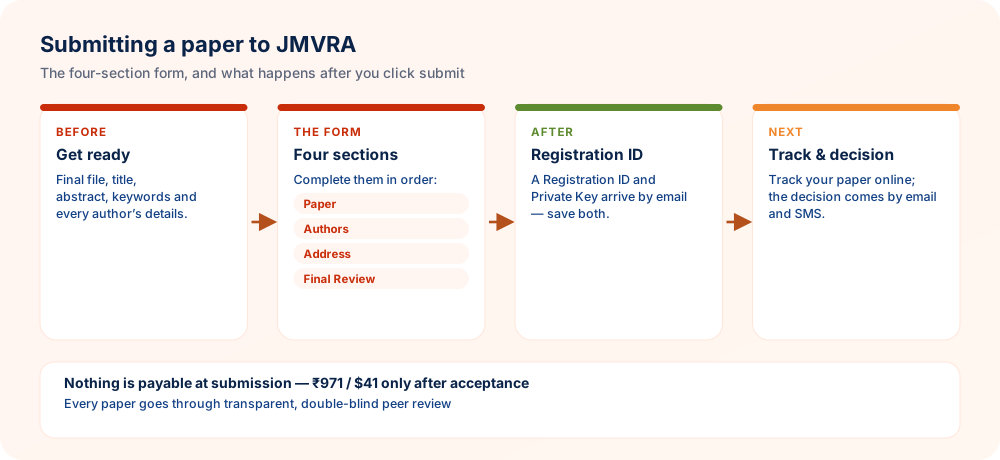
In short: go to JMVRA's online submission portal, fill in the four sections in sequence, Paper, Authors, Address, Final Review, and send the form. A Registration ID and Private Key reach you by email straight away. Store both, because they let you track the paper and ask for documents at every later stage.
What to Have Ready Prior to Submitting
Collect all the items below before opening the form. Leaving partway through to hunt for a missing detail is the commonest reason submissions end up inconsistent or incomplete. Keep the files and details open in separate windows so you can copy them accurately.
- Your completed research paper, laid out according to the manuscript template
- The paper's title, abstract and keywords
- Every author's full name, designation and institutional affiliation
- An accurate corresponding-author email address that you check regularly
- Mobile number and mailing address of the corresponding author
- Subject category or research area
- Your category as an author, such as student, faculty, industry or independent researcher, depending on the options on the form
- A manuscript file in whichever format the live portal presently accepts
Checklist to Complete Ahead of the Submission Page
- Spelling of the paper title verified
- Each author's name written exactly as it must be printed on the certificate
- Order of authors agreed by every co-author
- Affiliations verified and up to date
- Email and mobile number of the corresponding author confirmed
- Abstract finished and inside the required word range
- Keywords selected
- References fully listed and formatted consistently
- No other journal is considering the paper at the same time
- File saved in the format that is required now
The Submission Form in 4 Steps
Step 1 — Details of the Paper
Fill in the title, abstract, keywords, research type and research area, and then upload the manuscript file. At the upload field the form displays the present file-size limit, so look at it before attaching your file.
Step 2 — Details of the Authors
List all authors in the right order and clearly mark who the corresponding author is. Enter each author's designation, institution and contact details. JMVRA's published FAQ at present says the standard publication charge includes up to five authors, and more authors may incur an additional charge; confirm the current policy on the live portal, as author-limit terms may change.
Step 3 — Address
Fill in the corresponding author's street address, city or district, state or province, country and postal/PIN code. These details serve for correspondence and, if a printed copy is requested afterwards, for delivery. Re-read each line before moving on, because a small address slip can hold up anything sent to you.
Step 4 — Last Check Before Sending
Take one more look at the title, the list of authors and the uploaded file. Fill in a referral or reviewer code only if the form has such a field and you genuinely hold one. Include a message for the editor when it is relevant, agree to the terms and pass the anti-spam check, then submit.
Once You Click Submit
- A confirmation appears on screen and a confirmation email follows
- Your Registration ID and Private Key are included in that confirmation
- Store both in a safe place — they are needed to follow your paper's progress and to ask for documents after publication
- Do not post your Private Key anywhere public, and do not hand it to anyone who contacts you as JMVRA staff unless the request has been checked through [email protected]
What Happens Next
Your paper first goes through initial screening and then double-blind peer review, and the corresponding author is told of each status change and decision by email (and by SMS, where that is offered). Every status label and its meaning is explained in What to Do After Paper Submission.
Mistakes to Avoid
- Author names that do not match on the submission form and inside the manuscript itself
- A mistyped corresponding email address, which quietly blocks every status update from reaching you
- Losing the email with your Registration ID / Private Key because spam was not checked or the message was not filed straight away
- Sending the same paper to several journals together without telling anyone
- Attaching the wrong version of the file — after submitting, open the uploaded file again to be sure it is the final one
Troubleshooting
| Problem | What to Do |
|---|---|
| No confirmation email has arrived | Look in the spam and promotions folders first; if the message is really absent, write to [email protected] giving roughly when you submitted and the paper title. |
| File won't upload | Look again at the formats and size limit currently accepted on the portal, and make sure the file is not open in another program during the upload. |
| A typo in the title or author names was noticed after submitting | Write to [email protected] with your Registration ID and the precise correction needed — please do not send the paper in a second time. |
| The Registration ID or Private Key has been lost | Go through your inbox, spam folder included, for the first confirmation email; if it really cannot be located, contact [email protected] to learn the present recovery procedure. |
At-a-Glance Checklist
- File is finalSet in the template, with tracked changes cleared
- Author details correctNames as they must read on certificates and in DOI metadata
- Contact details that workAn email address and mobile number you actually monitor
- Keep your Registration IDTogether with the Private Key — both are needed later
- Avoid resubmittingMention your ID instead — repeat submissions only cause delays
Entering Author Information Correctly
| Field | Tip |
|---|---|
| Names | Written just as they should be printed |
| Order | Approved by every author before you submit |
| Affiliation | Department, institution, city and country |
| Email and phone | Active contacts for decisions by email and WhatsApp |
Following Up After Submission
- Note your paper ID — it is in the confirmation
- Watch email and WhatsApp — including spam folders
- Answer requests quickly — whether for revisions or documents
- Reach the editorial office — at [email protected], mentioning your paper ID
Avoiding Errors on an Online Paper Submission Form
Most submission problems come from small data-entry slips, not from the research. Preparing your information in advance makes the online form quicker to complete and the record cleaner afterwards.
- Prepare author details in advance. Collect each co-author's full name, affiliation, email address and postal details in a document before you begin. Copying from one source prevents spelling differences between fields.
- Confirm co-author consent. Tell every listed author that the paper is being sent and share the final version. Surprises about names or order cause disputes that are hard to settle later.
- Match the title exactly. Make sure the title typed in the form is identical to the title inside the manuscript file. Mismatches can lead to wrong certificates or confused records.
- Review the summary page slowly. Use the final review stage to read every field once more, including your email address. A single wrong character may stop later notifications from reaching you.
- Save the confirmation. Keep the acknowledgement message and any reference number in a safe folder. You will need them when you track your paper or ask a question.
Prepare all details beforehand, get co-author approval and read the final review page carefully before pressing the submit button.
Questions Researchers Often Ask
Your Paper's Journey at JMVRA, From Submission to Publication
- SubmitA paper ID is issued
- ScreenScope & similarity
- ReviewDouble-blind
- DecideEmail & SMS
- ReviseAnswer every point
- AcceptCopyright & fee
- ProduceDOI available on request
- PublishMonthly issue
How long review takes depends on the reviewers and on any revision required, so no set turnaround is promised; you are told of acceptance or rejection by email and WhatsApp.
Ready to Publish? Submit to JMVRA
JMVRA is aligned with UGC's Suggested Parameters for Choosing Peer-Reviewed Journals.
JMVRA is a Transparent, Peer-Reviewed, Open Access Journal (Refereed Journal). Following the discontinuation of the UGC and UGC-CARE journal listing, and in alignment with the latest UGC-CARE recommendations and guidelines, JMVRA is aligned with UGC’s Suggested Parameters for Choosing Peer-Reviewed Journals.
Helpful pages on jmvra.org
Key Terms
Subjects and search phrases this article addresses.
Related Reading
Further reading on the same theme from the JMVRA blog.
After You Submit to JMVRA: Status, Review & Next Steps
Read the guide RelatedYour Paper Is Published in JMVRA: What Comes Next
Read the guide RelatedThesis Publication: Journal Paper or Book?
Read the guide RelatedJMVRA Best Paper Award: Eligibility & Selection
Read the guide RelatedDownload Your JMVRA Certificate and Paper
Read the guide RelatedSearching Research Papers on JMVRA
Read the guide From the blogUGC CARE Journals: Current Guidelines & Complete Submission Process
Read the article From the blogPublishing in UGC CARE Journals: A Stepwise Guide
Read the article From the blogFrom Manuscript to DOI: How Long Publishing Takes
Read the articleKeep Reading on the JMVRA Blog
This guide belongs to the JMVRA journal blog, which offers practical advice on publishing, indexing, metrics and research integrity, written to be checkable instead of promotional.