
Proofs are the last chance to see your paper exactly as readers will, and the last point at which small errors can be fixed without a published correction. Typesetting can silently turn a Greek letter into a Latin one, shift a table column, misspell an affiliation or break a DOI. Yet proofs often arrive with a 48-hour deadline and an instruction not to rewrite. This guide explains what galley and page proofs are, what you may change, how to check each element and what happens if an error slips through.
What galley and page proofs are
After acceptance, a manuscript is copyedited and then typeset into the journal's layout. The proof is the typeset version sent to the corresponding author for checking before publication. Historically, galley proofs were long single-column strips of set type produced before the text was divided into pages, and page proofs showed the final layout. Today the terms are used interchangeably for a PDF or online proof showing the article as it will appear.
Proofs exist to catch errors introduced during production, not to improve the paper. Copyeditors adjust spelling conventions, punctuation, heading style, number formats and reference style; typesetters convert equations, place figures and rebuild tables. Each step can introduce mistakes that nobody at the journal can spot as reliably as the authors.
Some journals send one round of proofs; a few send a revised proof after your corrections. Either way, treat the proof you receive as final. If you are publishing with JMVRA, final steps before your paper goes live explains what happens after the fee is paid.
What you may and may not change
Journals differ in detail, but the boundaries below are close to universal.
| Change | Usual status | Notes |
|---|---|---|
| Typesetting errors: wrong symbol, lost text, broken layout | Allowed | The main purpose of proofs |
| Spelling of names, affiliations, emails | Allowed | Check against official records |
| Factual error in a number or label you notice | Allowed, with explanation | Show that it matches your data or accepted file |
| Updating “in press” references | Usually allowed | Give volume, pages and DOI |
| Restoring acknowledgements removed for blind review | Usually allowed | Many journals expect it at this stage |
| Adding an omitted funder or grant number | Editor approval | Explain why it was missing |
| Adding, removing or reordering authors | Editor approval and all authors' consent | Often refused at proof stage |
| Rewording for style | Not allowed | Unless it fixes an error of meaning |
| New results, analyses, figures or references | Not allowed | Would need further review |
The guiding rule: change what is wrong, not what could be better. Extensive changes delay publication and may send the paper back to the editor.
Answering author queries first
Copyeditors record their uncertainties as author queries, usually numbered AQ1, AQ2 and so on, in the PDF margin or on a separate query sheet. Typical queries ask you to:
- confirm which part of each author's name is the family name, which matters for indexing;
- supply missing reference details such as page ranges, volume numbers or publisher;
- resolve a reference cited in the text but absent from the list, or listed but never cited;
- expand an abbreviation at first use;
- confirm that an edit has not changed your meaning;
- provide a sharper figure or permission for reproduced material.
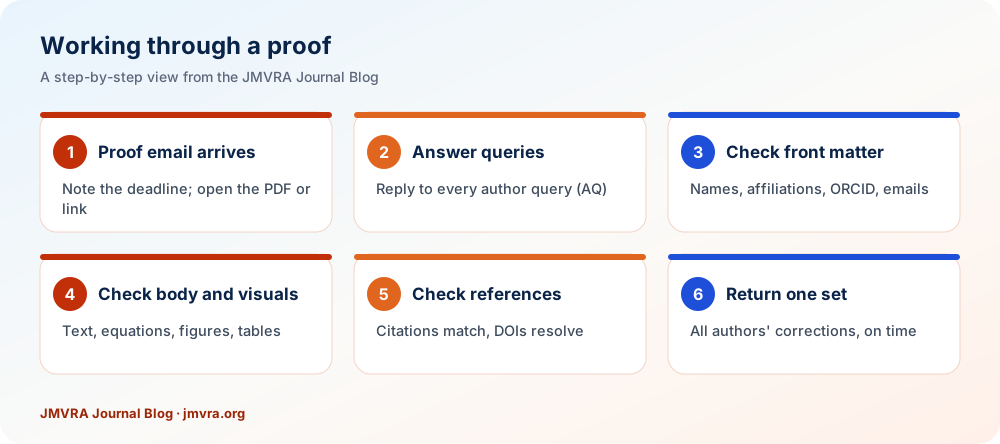
Answer every query, even if only with “Correct as set”. An unanswered query can hold up publication, or the typesetter may make an assumption you would not have chosen. Keep answers short and specific: “AQ4: Please insert page range 211–228.” Our guide to writing references correctly helps you resolve reference queries quickly.
Names, affiliations, ORCID and declarations
Front-matter errors do the most lasting damage, because they follow the article into databases, citation indexes and your CV. Check each item against an authoritative source, not memory:
- Author names: spelling, diacritics, order, and which part is the family name. Names written with initials, common in India, are often split wrongly, so confirm how each author wants to be cited.
- Affiliations: full official department and institution names, city and country, with each author linked to the right number.
- Corresponding author: correct email address and marker.
- ORCID iDs: each iD belongs to the right person and the link resolves; see creating and using your ORCID iD.
- Title, abstract and keywords: nothing truncated, italics kept for species names and symbols.
- Dates and identifiers: received, revised and accepted dates, and the DOI if one is shown.
- Declarations: funding, competing interests and acknowledgements complete, especially if they were removed for double-blind review.
These fields feed the metadata sent to indexing services, so mistakes here are harder to fix later; the article metadata checklist explains why.
Body text, symbols and equations
Read the full text against your accepted manuscript rather than skimming. Having a co-author read the original aloud while you follow the proof catches far more than silent reading. Concentrate on the places where conversion errors cluster:
- Special characters: Greek letters (µ becoming m is common), ±, ≤, ≥, degree signs, minus signs, primes and superscripts.
- Equations: every subscript, bracket, fraction bar and operator; variables in italic and units upright; numbering continuous and cited correctly in the text.
- Numbers and units: decimal points, thousand separators, units, percentages and p-values unchanged.
- Headings and lists: correct levels, nothing merged or dropped.
- Cross-references: “see Table 3” still points to Table 3, and section numbers match.
- Copyedits: house-style changes are expected, but check that each reworded sentence still says what you meant.
Look closely at text near page breaks, figure placements and the ends of tables, where lines are sometimes lost during layout.
Figures and tables
Figures and tables are resized or rebuilt during typesetting, so check each one individually:
- the correct figure appears under the correct number, with none missing or duplicated;
- images are sharp at normal zoom, nothing is cropped, and axis labels, scale bars and legends are legible;
- colours still distinguish data series, and the figure remains readable in greyscale if the journal prints;
- captions match their figures and include any required credit or permission line;
- table rows and columns line up, headings sit over the right columns and no value has shifted cell;
- units in headers, footnote symbols and abbreviations are intact;
- figures and tables are cited in the text in numerical order.
If a figure has degraded, supply a replacement file at the required resolution rather than describing the problem; our guide to preparing figures and tables lists typical requirements. Resist redesigning a figure at this stage: correct only what is wrong.
References and citations
Reference lists are usually reformatted by software, and automated conversion is a frequent source of errors. Check that:
- every in-text citation has a matching entry, and every entry is cited;
- numbered references run in order of first citation, and author–date citations match names and years exactly;
- author names, initials and particles such as de, van or al- are correct;
- titles, journal names, volumes, issues and page ranges are complete;
- DOIs are present where available and lead to the right article;
- “in press” and preprint items are updated if they have since been formally published.
How to mark corrections clearly
Journals specify the method; follow it exactly. The three common routes are:
- Online proofing system: you edit or annotate in a browser tool, and changes are tracked automatically.
- Annotated PDF: use the reader's comment tools, such as Replace text, Insert text, Strike-through and sticky notes. Avoid freehand drawing, and never edit the PDF content itself.
- Correction list: a numbered list giving page, column and line, the current text and the corrected text.
2. Page 7, Equation 4: the exponent should be −2, not 2.
3. Page 9, Table 2, row 3, column 4: 0.47 should read 0.74 (digits transposed; see accepted manuscript).
4. AQ3: Correct as set.
Whatever the method, the corresponding author should gather every co-author's corrections and return one consolidated set. Separate messages from different authors lead to missed or contradictory changes. Make each correction unambiguous: a typesetter should be able to apply it without guessing.
Deadlines and turnaround
Proof deadlines are short, commonly 48 to 72 hours and seldom more than a week, because the article is already scheduled for an issue or for online release. Make sure the corresponding author will be reachable around acceptance, and agree in advance who checks what.
- If you cannot meet the deadline, reply at once and ask for a specific extension; production teams can often allow a day or two if asked early.
- Some journals state that if no reply arrives, the article will be published as set. Silence can count as approval.
- Usually only one round of author corrections is allowed, so check thoroughly the first time.
- If a revised proof is sent, confirm that each correction was applied and that nothing new broke.
To work fast without cutting corners, divide the task: one co-author checks text and equations, another figures and tables, a third references, while the corresponding author answers queries and consolidates the final list.
After publication: corrections and errata
Once published, the article becomes the version of record. Reputable journals do not edit it silently; changes are made through a linked correction notice, so readers and indexes can see what changed and when. Terminology varies, but many publishers use erratum for an error introduced by the journal during production and corrigendum for an error made by the authors, while others call both a correction.
If you find an error after publication, write to the editor giving the exact location, the incorrect and correct text, and whether it affects the findings. Small errors lead to a correction notice; errors that undermine the conclusions may need a more serious outcome, as explained in corrections, retractions and expressions of concern. Where a journal uses Crossmark, the article's status button tells readers that an update exists. For a JMVRA paper, send correction requests to [email protected] with the article title, and the DOI if one was registered.
Quick Checklist
- Answer all queriesEvery AQ, even if only “correct as set”
- Verify front matterNames, affiliations, ORCID, corresponding email
- Compare the textSymbols, equations and numbers against accepted file
- Inspect visualsFigures, captions and table alignment
- Test referencesCitations match and DOIs resolve
- Return on timeOne consolidated set from all authors
Proofreading habits that catch more errors
Errors survive proofs because people read what they expect to see. These habits break that pattern.
- Enlarge or print. Reading at 150% zoom or on paper reveals symbols, superscripts and minus signs that vanish at normal screen size.
- Read in passes. Check one element at a time — names, then equations, then tables, then references — rather than everything at once.
- Compare, do not recall. Keep the accepted manuscript open beside the proof and compare line by line instead of relying on memory.
- Read backwards for spelling. Reading a reference list or short section from end to start stops your brain from filling in expected words.
- Keep a record. Save the proof, your correction list and the journal's confirmation in case a question arises after publication.
Proofs are for fixing errors, not improving the paper, and they are the cheapest place to fix them.
Questions Researchers Often Ask
In Summary
Proof checking is short but high-stakes work. Answer every author query, verify names, affiliations and ORCID iDs against official records, compare the text, symbols and equations with your accepted manuscript, inspect each figure and table, and test the references and DOIs. Mark corrections in the format the journal asks for, send one consolidated set and meet the deadline. If you chose the optional DOI add-on, confirm the DOI shown in your proof; the Crossref DOI page explains how JMVRA handles registration. Errors found later can still be fixed, but only through a public correction.
Ready to send in your paper?
Online submission to JMVRA is free of charge. Papers are screened first and then go through transparent, double-blind peer review; ₹971 INR (Indian authors) or $41 USD (foreign authors) is due only after acceptance. Retain every confirmation email for your records.
References and Sources
Taking a Draft Through to a Published Paper
- PrepareStick to the template and author guidelines
- Submit onlineCosts nothing; write down your paper ID
- ScreeningSubject scope, declarations and similarity below 15%
- Double-blind reviewDecision by email and WhatsApp
- AcceptedThe ₹971 INR / $41 USD fee becomes due, and the paper is then published in open access
Details are available under Publication guidelines · Peer review · Publication charges.
Ready to Publish? Submit to JMVRA
JMVRA is aligned with UGC's Suggested Parameters for Choosing Peer-Reviewed Journals.
JMVRA is a Transparent, Peer-Reviewed, Open Access Journal (Refereed Journal). Following the discontinuation of the UGC and UGC-CARE journal listing, and in alignment with the latest UGC-CARE recommendations and guidelines, JMVRA is aligned with UGC’s Suggested Parameters for Choosing Peer-Reviewed Journals.
More useful pages at jmvra.org
Key Terms
Subjects and search phrases this article addresses.
Related Reading
More JMVRA guides that pair well with this one.
Keep Reading on the JMVRA Blog
You are reading part of the JMVRA journal blog, a source of hands-on guidance about publishing, indexing, metrics and research integrity that aims to be verifiable, not promotional.