

Plenty of low-cost journals claim to be “indexed in SSRN”. This sounds impressive, but SSRN is a different thing: an open repository where researchers themselves post working papers and preprints. Knowing what SSRN is, and what it is not, keeps you from paying for a claim worth little and shows how to use SSRN properly for your own computer science work. A short look at how a repository differs from an index is time well spent before you submit anywhere.
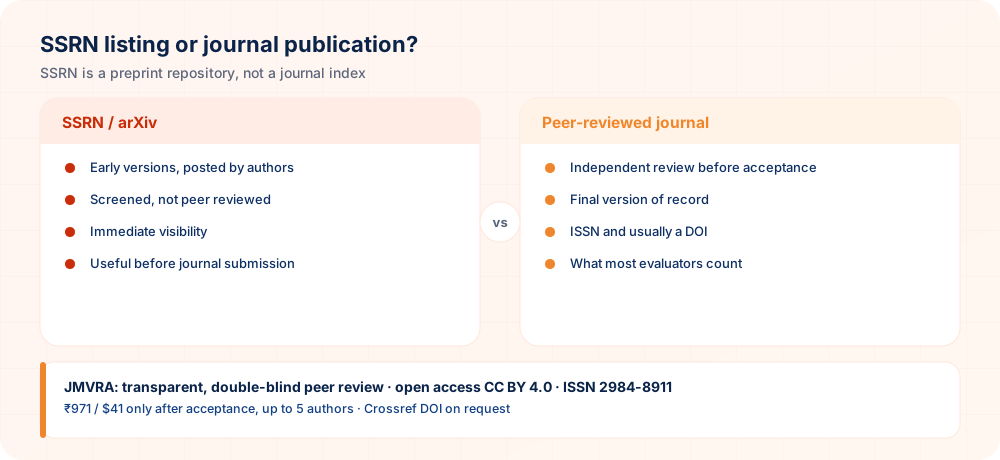
What SSRN Really Is
SSRN (originally the Social Science Research Network) is an open-access repository that Elsevier owns. Authors upload working papers, preprints and accepted manuscripts. SSRN performs a basic suitability check but does not peer review the papers, and unlike Scopus or Web of Science it does not assess journals for inclusion.
SSRN versus arXiv in Computer Science
| SSRN | arXiv | |
|---|---|---|
| Strongest in | Economics, law, management, social sciences | Computer science, physics, mathematics, statistics |
| Moderation | Light suitability screening | Moderation plus endorsement for first-time posters |
| Peer review | None | None |
| Identifier | SSRN abstract ID; DOIs on many papers | arXiv ID; DOIs available through DataCite |
| Usual role for CS | Interdisciplinary work (FinTech, law and AI, e-governance) | The default preprint server for most CS subfields |
Using a Repository Properly
- Read the journal’s preprint policy first. Most journals permit preprints, though a few do not.
- Post only the version you may share. That is usually the preprint or accepted manuscript rather than the publisher’s typeset PDF.
- Connect the versions. Once the article is out, add the journal DOI to the repository record so readers reach the version of record.
- Maintain a single canonical citation. Request that readers cite the journal article instead of the preprint.
What to Verify Instead of “SSRN Indexed”
- Check selective indexing yourself at Scopus Sources, the Master Journal List or DOAJ.
- Google Scholar coverage: search for the journal’s recent article titles.
- Published articles that carry a working Crossref DOI.
- An editorial board with names and affiliations that can be checked.
- Peer review and fee policies that are openly published and easy to follow.
Low Cost, Not Lower Standards
A small publication fee is not in itself a red flag, as many sound journals keep their charges down. The real question is what the fee covers: genuine peer review, editing, DOI registration, hosting and archiving. Ask the journal what is included, when payment falls due, and whether anything is charged before acceptance.
Step-by-Step: Posting a Working Paper to SSRN
- Open an SSRN account. Register with your institutional email address and a consistent version of your name.
- Select “Submit a paper”. Fill in the title, abstract, keywords and co-authors.
- Pick networks and classifications. Choose the subject networks that fit your paper, such as Information Systems or Law & Technology.
- Upload the PDF you have the right to share. This is normally a preprint or an accepted manuscript.
- Await approval. SSRN checks suitability, after which the paper goes public with an abstract ID.
- Revise the record after publication. Put the journal citation and DOI on the SSRN record.
The 10 Most-Searched Questions on This Topic
Here are the ten questions researchers search for most on this subject, each with a direct answer.
SSRN indexed journal meaning
It generally means the journal’s articles have been posted to SSRN, a repository; it does not mean SSRN evaluated or indexed the journal.
is SSRN peer reviewed
No. SSRN hosts working papers and preprints that have not been peer reviewed.
is SSRN Scopus indexed
No. Posting a paper to SSRN does not make it Scopus indexed; only the journal that publishes it can be.
how to upload paper on SSRN
Open a free SSRN account, pick the relevant network, upload your PDF together with the abstract and keywords, and send it for the suitability review.
SSRN vs arXiv
For computer science the main preprint server is arXiv, while SSRN is strongest in economics, law and social sciences.
low cost computer science journal
A CS journal that charges a modest fee should be judged on its review process, DOI, verifiable indexing and editorial board, not on price alone.
arXiv preprint computer science
Your paper posted publicly, free to read and time-stamped, before or during peer review.
does SSRN give DOI
A DOI appears on many SSRN papers, but it identifies the SSRN posting and not a peer-reviewed journal article.
preprint policy of journal
The journal’s rule about whether and which versions of your paper you may post elsewhere.
journal indexing verification
Verify the journal in the database itself (Scopus Sources, the Master Journal List, DOAJ) rather than on the journal’s own badge page.
How JMVRA Fits In
JMVRA is a Transparent, Peer-Reviewed, Open Access Journal (Refereed Journal). Following the discontinuation of the UGC and UGC-CARE journal listing, and in alignment with the latest UGC-CARE recommendations and guidelines, JMVRA is aligned with UGC’s Suggested Parameters for Choosing Peer-Reviewed Journals. UGC public notice (PDF)
JMVRA does not present repositories as indexing. Openly, it is indexed in Google Scholar and registered with Crossref for DOIs; it is not indexed in Scopus, Web of Science or DOAJ.
- ISSN
- 2984-8911 (online) · publishing since June 2023
- Issues
- Monthly issues across many disciplines
- Review
- Two-way anonymous review by specialists
- Access
- Open access, licensed CC BY 4.0
- Fee
- ₹971 INR for Indian and $41 USD for foreign authors, due only after acceptance
- DOI
- Crossref — available as an optional extra
- Indexing
- Listed in Google Scholar; not listed in Scopus, Web of Science or DOAJ
- Impact factor
- 11.25, derived from Google Scholar data
Screening begins the moment a paper arrives and each decision is sent as soon as it is reached, yet JMVRA never promises a set number of days: actual review time depends on the reviewers and on how much revision the paper needs.
At-a-Glance Checklist
- Preprint policy checkedOf your target journal
- Versions linkedPreprint to article
- Claim understoodSSRN is not indexing
- Journal verifiedISSN and review
- Final version citedOnce published
Stronger Repositories for Computer Science
| Repository | Use |
|---|---|
| arXiv (cs) | Main preprint server for computer science |
| Zenodo | Code, data and documents with DOIs |
| Institutional repository | Your university’s archive |
| GitHub | Code (archive releases on Zenodo for a DOI) |
Describing a Repository Posting Correctly
Handling Repository Postings and Journal Submission Together
Computer science authors frequently share preprints before formal review. These tips explain how to do this without creating trouble with the journal that eventually publishes your work.
- Read the journal's preprint policy. Before posting a draft anywhere, check what the target journal says about earlier versions. Most are comfortable with preprints, but expectations about disclosure and citation differ.
- Version your drafts clearly. Label each posted draft with a version note and keep your local copy in step. When the final paper appears, update the repository entry so readers can find the definitive text.
- Release code and data thoughtfully. Computer science reviewers value reproducibility. Share code, datasets and configuration files in a stable archive, and include the licence so others know what reuse is permitted.
- Describe the posting accurately. In your biography or cover letter, call a repository entry a preprint or working paper. Avoid wording that suggests peer review or journal indexing has taken place.
- Watch for conflicting claims. If a later revision changes your results, make sure earlier versions are clearly marked as superseded. Mismatched numbers across versions can confuse reviewers and readers alike.
Use repositories to share work openly, but describe them honestly and keep versions, code and policies consistent from draft to publication.
Questions Researchers Often Ask
Where JMVRA Appears — With Current Figures
Verify Google Scholar coverage in a minute
- Look up the titlePaste the whole article title into the Google Scholar search box.
- Use source:Type
source:"Journal Name"to list a journal’s papers. - Go to the profileCheck if the journal has a citation profile, then open it.
The Indexing & Discovery page gathers the links to every one of those records, with figures as of 30 Sep 2026.
Ready to Publish? Submit to JMVRA
JMVRA is aligned with UGC's Suggested Parameters for Choosing Peer-Reviewed Journals.
JMVRA is a Transparent, Peer-Reviewed, Open Access Journal (Refereed Journal). Following the discontinuation of the UGC and UGC-CARE journal listing, and in alignment with the latest UGC-CARE recommendations and guidelines, JMVRA is aligned with UGC’s Suggested Parameters for Choosing Peer-Reviewed Journals.
Helpful pages on jmvra.org
Key Terms
Subjects and search phrases this article addresses.
Related Reading
Further reading on the same theme from the JMVRA blog.
Speeding Up Publication of a CS Paper Honestly
Read the guide RelatedChoosing a Peer-Reviewed CS Journal in India
Read the guide Related10 Signs of a Good Computer Science Journal
Read the guide RelatedChecking a Journal's Indexing Claims One by One
Read the guide RelatedAcademia.edu, ResearchGate or Google Scholar: Which One Should You Choose?
Read the guide RelatedZenodo DOI or Journal Crossref DOI? Choosing Right
Read the guideKeep Reading on the JMVRA Blog
This guide belongs to the JMVRA journal blog, which offers practical advice on publishing, indexing, metrics and research integrity, written to be checkable instead of promotional.